What's inside
Form content
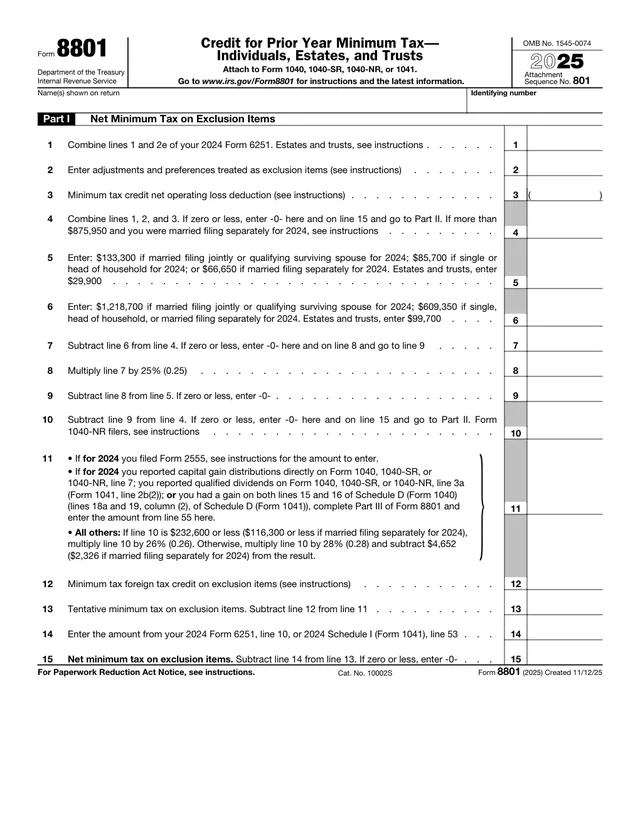
Credit for Prior Year Minimum Tax—
Individuals, Estates, and Trusts
Attach to Form 1040, 1040-SR, 1040-NR, or 1041.
Go to www.irs.gov/Form8801 for instructions and the latest information.
2025
Attachment
Sequence No. 801
Name(s) shown on return
Identifying number
Part I
Net Minimum Tax on Exclusion Items
1
Combine lines 1 and 2e of your 2024 Form 6251. Estates and trusts, see instructions .
.
.
.
.
.
1
2
Enter adjustments and preferences treated as exclusion items (see instructions)
.
.
.
.
.
.
.
2
3
Minimum tax credit net operating loss deduction (see instructions) .
.
.
.
.
.
.
.
.
.
.
.
3 ( )
4
Combine lines 1, 2, and 3. If zero or less, enter -0- here and on line 15 and go to Part II. If more than
$875,950 and you were married filing separately for 2024, see instructions
.
.
.
.
.
.
.
.
.
4
5
Enter: $133,300 if married filing jointly or qualifying surviving spouse for 2024; $85,700 if single or head of household for 2024; or $66,650 if married filing separately for 2024. Estates and trusts, enter
$29,900
.
.
.
.
.
.
.
.
.
.
.
.
.
.
.
.
.
.
.
.
.
.
.
.
.
.
.
.
.
.
.
5
6
Enter: $1,218,700 if married filing jointly or qualifying surviving spouse for 2024; $609,350 if single, head
How to fill it
Fill or edit this form in MePDF
- Preview page 1 to confirm the form name and revision.
- Select Fill form to answer the form one page at a time.
- Type an answer for each field; checkboxes and choices use the form’s own options.
- Preview the finished pages, then download the flattened PDF.
- The downloaded copy is image-only, so it cannot be edited as a form again.
Keep the tax year and filing status consistent on every page. The editor keeps the original layout while you fill the existing fields.