What's inside
Form content
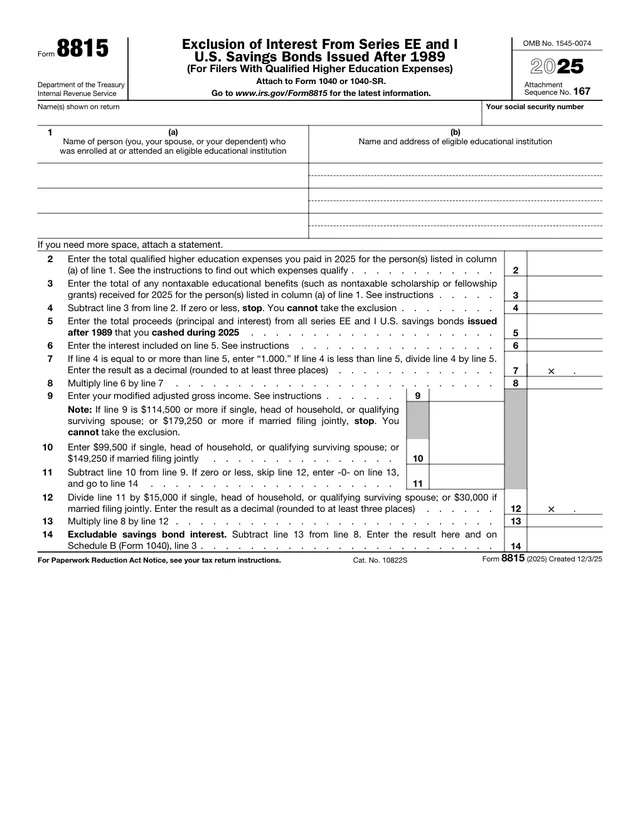
Exclusion of Interest From Series EE and I
U.S. Savings Bonds Issued After 1989
(For Filers With Qualified Higher Education Expenses)
Attach to Form 1040 or 1040-SR.
Go to www.irs.gov/Form8815 for the latest information.
2025
Attachment
Sequence No. 167
Name(s) shown on return
Your social security number
1
(a)
Name of person (you, your spouse, or your dependent) who was enrolled at or attended an eligible educational institution
(b)
Name and address of eligible educational institution
If you need more space, attach a statement.
2
Enter the total qualified higher education expenses you paid in 2025 for the person(s) listed in column
(a) of line 1. See the instructions to find out which expenses qualify .
.
.
.
.
.
.
.
.
.
.
.
2
3
Enter the total of any nontaxable educational benefits (such as nontaxable scholarship or fellowship grants) received for 2025 for the person(s) listed in column (a) of line 1. See instructions .
.
.
.
.
3
4
Subtract line 3 from line 2. If zero or less, stop. You cannot take the exclusion .
.
.
.
.
.
.
.
4
5
Enter the total proceeds (principal and interest) from all series EE and I U.S. savings bonds issued after 1989 that you cashed during 2025
.
.
.
.
.
.
How to fill it
Fill or edit this form in MePDF
- Preview page 1 to confirm the form name and revision.
- Select Fill form to answer the form one page at a time.
- Type an answer for each field; checkboxes and choices use the form’s own options.
- Preview the finished pages, then download the flattened PDF.
- The downloaded copy is image-only, so it cannot be edited as a form again.
Keep the tax year and filing status consistent on every page. The editor keeps the original layout while you fill the existing fields.