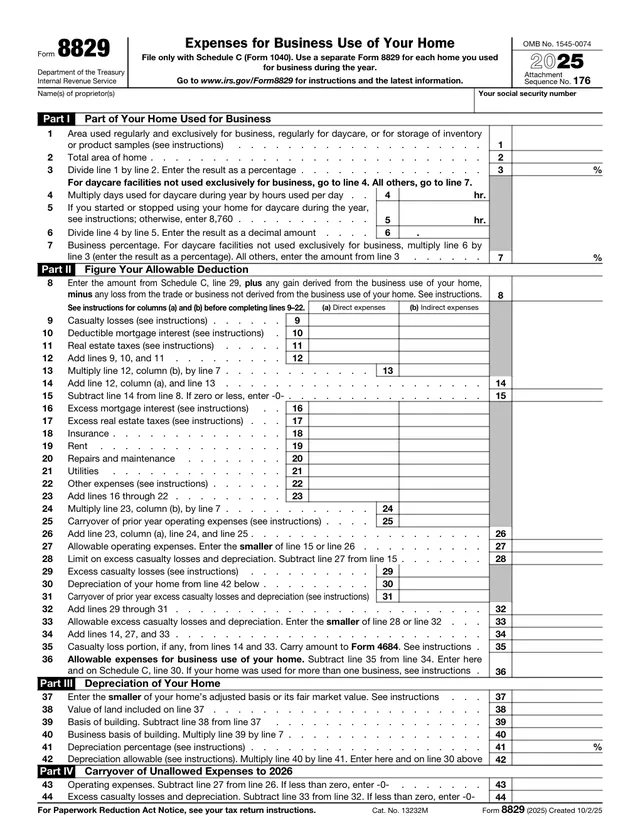
What's inside
Form content
2025
Expenses for Business Use of Your Home
File only with Schedule C (Form 1040). Use a separate Form 8829 for each home you used for business during the year.
Go to www.irs.gov/Form8829 for instructions and the latest information.
Attachment
Sequence No. 176
Name(s) of proprietor(s)
Your social security number
Part I
Part of Your Home Used for Business
1
Area used regularly and exclusively for business, regularly for daycare, or for storage of inventory or product samples (see instructions)
.
.
.
.
.
.
.
.
.
.
.
.
.
.
.
.
.
.
.
.
1
2
Total area of home .
.
.
.
.
.
.
.
.
.
.
.
.
.
.
.
.
.
.
.
.
.
.
.
.
.
.
2
3
Divide line 1 by line 2. Enter the result as a percentage .
.
.
.
.
.
.
.
.
.
.
.
.
.
.
3
%
For daycare facilities not used exclusively for business, go to line 4. All others, go to line 7.
4
Multiply days used for daycare during year by hours used per day .
.
4 hr.
5
If you started or stopped using your home for daycare during the year, see instructions; otherwise, enter 8,760 .
.
.
.
.
.
.
.
.
.
.
5 hr.
6
Divide line 4 by line 5. Enter the result as a decimal amount
.
.
.
.
6
.
7
Business percentage. For daycare facilities not used exclusively for business, multiply line 6
How to fill it
Fill or edit this form in MePDF
- Preview page 1 to confirm the form name and revision.
- Select Fill form to answer the form one page at a time.
- Type an answer for each field; checkboxes and choices use the form’s own options.
- Preview the finished pages, then download the flattened PDF.
- The downloaded copy is image-only, so it cannot be edited as a form again.
Keep the tax year and filing status consistent on every page. The editor keeps the original layout while you fill the existing fields.