What's inside
Form content
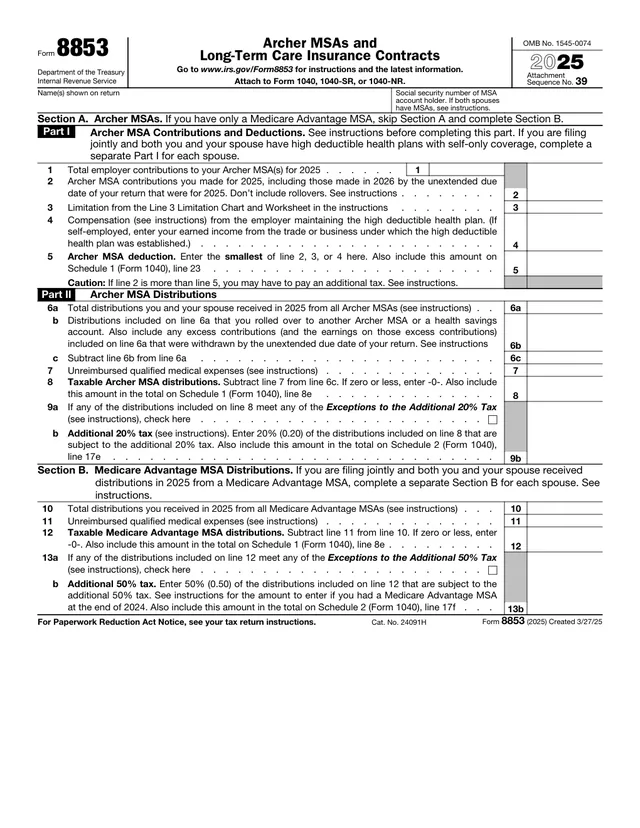
Archer MSAs and
Long-Term Care Insurance Contracts
Go to www.irs.gov/Form8853 for instructions and the latest information.
Attach to Form 1040, 1040-SR, or 1040-NR.
2025
Attachment
Sequence No. 39
Name(s) shown on return
Social security number of MSA account holder. If both spouses have MSAs, see instructions.
Section A. Archer MSAs. If you have only a Medicare Advantage MSA, skip Section A and complete Section B.
Part I
Archer MSA Contributions and Deductions. See instructions before completing this part. If you are filing jointly and both you and your spouse have high deductible health plans with self-only coverage, complete a separate Part I for each spouse.
1
Total employer contributions to your Archer MSA(s) for 2025 .
.
.
.
.
.
1
2
Archer MSA contributions you made for 2025, including those made in 2026 by the unextended due date of your return that were for 2025. Don’t include rollovers. See instructions .
.
.
.
.
.
.
.
2
3
Limitation from the Line 3 Limitation Chart and Worksheet in the instructions
.
.
.
.
.
.
.
.
3
4
Compensation (see instructions) from the employer maintaining the high deductible health plan. (If self-employed, enter your earned income from the trade or
How to fill it
Fill or edit this form in MePDF
- Preview page 1 to confirm the form name and revision.
- Select Fill form to answer the form one page at a time.
- Type an answer for each field; checkboxes and choices use the form’s own options.
- Preview the finished pages, then download the flattened PDF.
- The downloaded copy is image-only, so it cannot be edited as a form again.
Keep the tax year and filing status consistent on every page. The editor keeps the original layout while you fill the existing fields.