What's inside
Form content
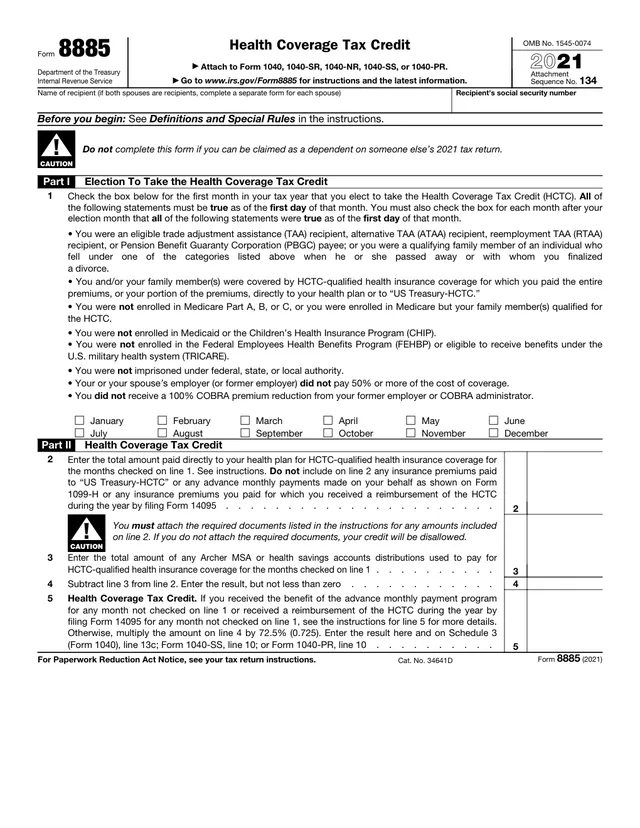
Health Coverage Tax Credit
▶ Attach to Form 1040, 1040-SR, 1040-NR, 1040-SS, or 1040-PR.
▶ Go to www.irs.gov/Form8885 for instructions and the latest information.
2021
Attachment
Sequence No. 134
Name of recipient (if both spouses are recipients, complete a separate form for each spouse)
Recipient’s social security number
Before you begin: See Definitions and Special Rules in the instructions.
▲
!
CAUTION
Do not complete this form if you can be claimed as a dependent on someone else’s 2021 tax return.
Part I
Election To Take the Health Coverage Tax Credit
1
Check the box below for the first month in your tax year that you elect to take the Health Coverage Tax Credit (HCTC). All of the following statements must be true as of the first day of that month. You must also check the box for each month after your election month that all of the following statements were true as of the first day of that month.
• You were an eligible trade adjustment assistance (TAA) recipient, alternative TAA (ATAA) recipient, reemployment TAA (RTAA) recipient, or Pension Benefit Guaranty Corporation (PBGC) payee; or you were a qualifying family member of an individual who fell under one of the categories li
How to fill it
Fill or edit this form in MePDF
- Preview page 1 to confirm the form name and revision.
- Select Fill form to answer the form one page at a time.
- Type an answer for each field; checkboxes and choices use the form’s own options.
- Preview the finished pages, then download the flattened PDF.
- The downloaded copy is image-only, so it cannot be edited as a form again.
Keep the tax year and filing status consistent on every page. The editor keeps the original layout while you fill the existing fields.