What's inside
Form content
(Rev. December 2019)
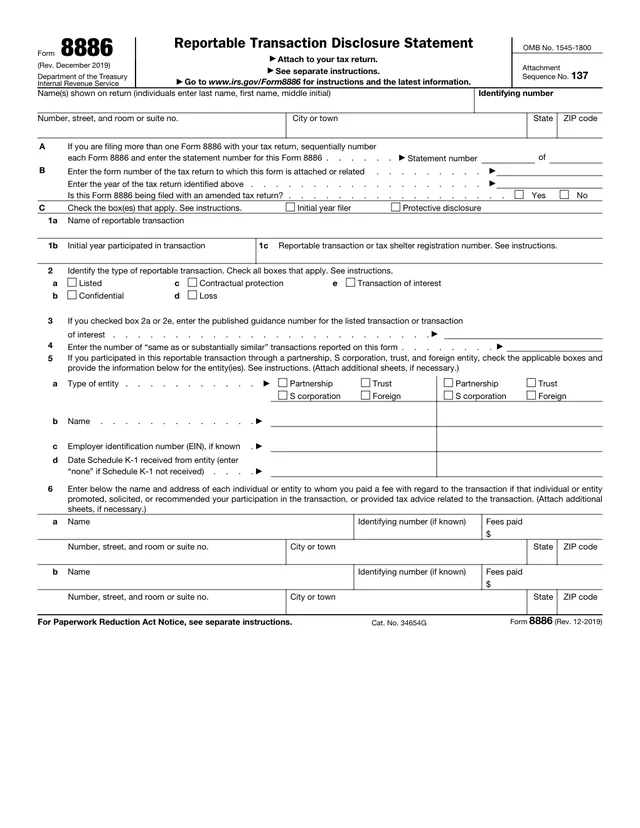
Reportable Transaction Disclosure Statement
▶ Attach to your tax return.
▶ See separate instructions.
▶ Go to www.irs.gov/Form8886 for instructions and the latest information.
Attachment
Sequence No. 137
Name(s) shown on return (individuals enter last name, first name, middle initial)
Identifying number
Number, street, and room or suite no.
City or town
State
ZIP code
A
If you are filing more than one Form 8886 with your tax return, sequentially number each Form 8886 and enter the statement number for this Form 8886 .
.
.
.
.
.
▶Statement number of
B
Enter the form number of the tax return to which this form is attached or related
.
.
.
.
.
.
.
.
.
▶
Enter the year of the tax return identified above .
.
.
.
.
.
.
.
.
.
.
.
.
.
.
.
.
.
.
▶
Is this Form 8886 being filed with an amended tax return? .
.
.
.
.
.
.
.
.
.
.
.
.
.
.
.
.
.
Yes
No
C
Check the box(es) that apply. See instructions.
Initial year filer
Protective disclosure
1a
Name of reportable transaction
1 b
Initial year participated in transaction
1c
Reportable transaction or tax shelter registration number. See instructions.
2
Identify the type of reportable transaction. Check all boxes that apply. See
How to fill it
Fill or edit this form in MePDF
- Preview page 1 to confirm the form name and revision.
- Select Fill form to answer the form one page at a time.
- Type an answer for each field; checkboxes and choices use the form’s own options.
- Preview the finished pages, then download the flattened PDF.
- The downloaded copy is image-only, so it cannot be edited as a form again.
Keep the tax year and filing status consistent on every page. The editor keeps the original layout while you fill the existing fields.