What's inside
Form content
(Rev. October 2024)
Statement for Individuals Who Begin or End
Bona Fide Residence in a U.S. Territory
See separate instructions.
Do not file with your tax return.
Go to www.irs.gov/Form8898 for instructions and the latest information.
Name. If married, file a separate form for each spouse required to file Form 8898.
Your social security number:
Address before your change in bona fide residence status (see instructions):
Address after your change in bona fide residence status (see instructions):
Part I
General Information
1
I am notifying the IRS that I (check box a or b below and enter the tax year in the space provided):
a became b ceased to be } a bona fide resident of a U.S. territory in tax year:
c
Of which U.S. territory did you become (or cease to be) a bona fide resident?
American Samoa
Guam
Commonwealth of the Northern Mariana Islands (CNMI)
Commonwealth of Puerto Rico
U.S. Virgin Islands
2
Are you a U.S. citizen or resident alien? See instructions
.
.
.
.
.
.
.
.
.
.
.
.
.
.
.
.
.
.
Yes
No
3 a
Enter your worldwide gross income for the tax year entered on line 1 .
.
.
.
.
.
.
.
.
.
.
.
.
.
.
b
Enter your average worldwide gross income for the 3-year period prior to the tax
How to fill it
Fill or edit this form in MePDF
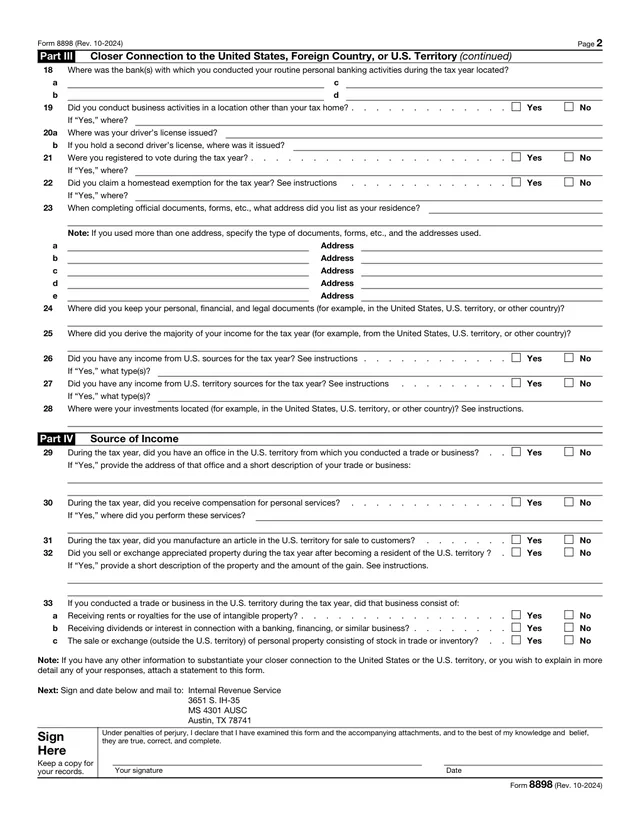
- Preview page 2 to confirm the form name and revision.
- Select Fill form to answer the form one page at a time.
- Type an answer for each field; checkboxes and choices use the form’s own options.
- Preview the finished pages, then download the flattened PDF.
- The downloaded copy is image-only, so it cannot be edited as a form again.
Keep the tax year and filing status consistent on every page. The editor keeps the original layout while you fill the existing fields.