What's inside
Form content
(Rev. January 2022)
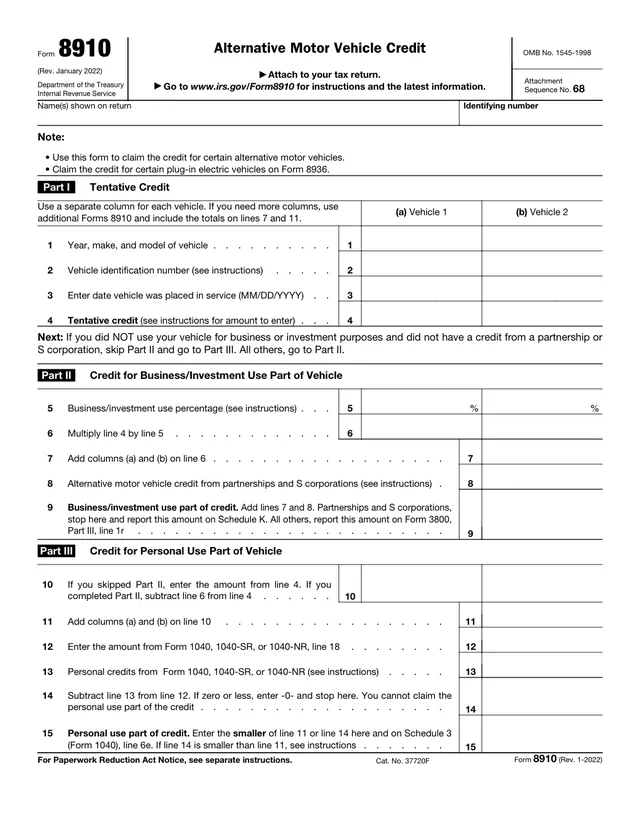
Alternative Motor Vehicle Credit
▶ Attach to your tax return.
▶ Go to www.irs.gov/Form8910 for instructions and the latest information.
Attachment
Sequence No. 68
Name(s) shown on return
Identifying number
Note:
• Use this form to claim the credit for certain alternative motor vehicles.
• Claim the credit for certain plug-in electric vehicles on Form 8936.
Part I
Tentative Credit
Use a separate column for each vehicle. If you need more columns, use additional Forms 8910 and include the totals on lines 7 and 11.
(a) Vehicle 1
(b) Vehicle 2
1
Year, make, and model of vehicle .
.
.
.
.
.
.
.
.
.
1
2
Vehicle identification number (see instructions)
.
.
.
.
.
2
3
Enter date vehicle was placed in service (MM/DD/YYYY) .
.
3
4
Tentative credit (see instructions for amount to enter) .
.
.
4
Next: If you did NOT use your vehicle for business or investment purposes and did not have a credit from a partnership or
S corporation, skip Part II and go to Part III. All others, go to Part II.
Part II
Credit for Business/Investment Use Part of Vehicle
5
Business/investment use percentage (see instructions) .
.
.
5
%
%
6
Multiply line 4 by line 5
.
.
.
.
.
.
.
.
.
.
.
.
.
6
7
Add c
How to fill it
Fill or edit this form in MePDF
- Preview page 1 to confirm the form name and revision.
- Select Fill form to answer the form one page at a time.
- Type an answer for each field; checkboxes and choices use the form’s own options.
- Preview the finished pages, then download the flattened PDF.
- The downloaded copy is image-only, so it cannot be edited as a form again.
Keep the tax year and filing status consistent on every page. The editor keeps the original layout while you fill the existing fields.