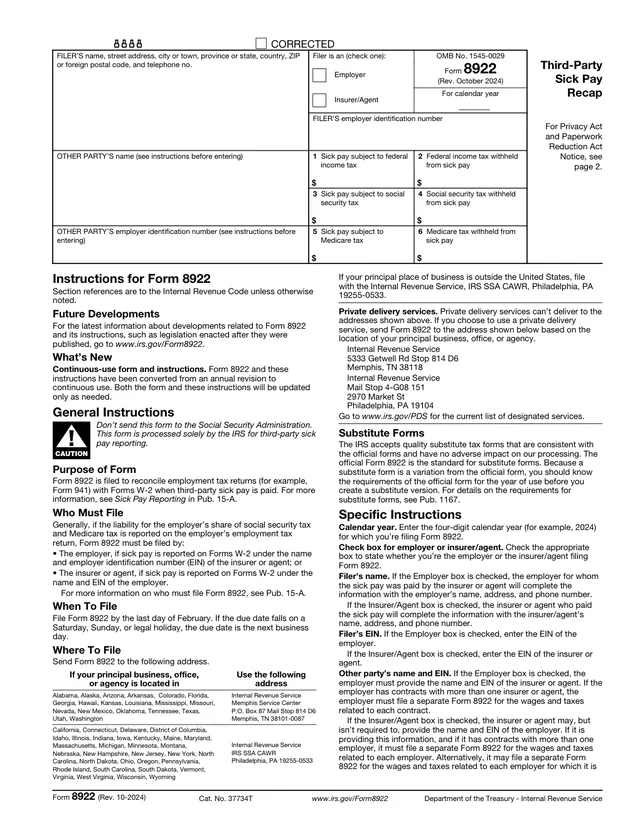
What's inside
Form content
(Rev. October 2024)
Cat. No. 37734T
Third-Party
Sick Pay
Recap
For Privacy Act and Paperwork
Reduction Act
Notice, see page 2.
For calendar year
8888
CORRECTED
FILER’S name, street address, city or town, province or state, country, ZIP or foreign postal code, and telephone no.
OTHER PARTY’S name (see instructions before entering)
OTHER PARTY’S employer identification number (see instructions before entering)
Filer is an (check one):
Employer
Insurer/Agent
FILER’S employer identification number
1 Sick pay subject to federal income tax
$
2 Federal income tax withheld from sick pay
$
3 Sick pay subject to social security tax
$
4 Social security tax withheld from sick pay
$
5 Sick pay subject to
Medicare tax
$
6 Medicare tax withheld from sick pay
$
Instructions for Form 8922
Section references are to the Internal Revenue Code unless otherwise noted.
Future Developments
For the latest information about developments related to Form 8922 and its instructions, such as legislation enacted after they were published, go to www.irs.gov/Form8922.
What’s New
Continuous-use form and instructions. Form 8922 and these instructions have been converted from an annual revision to continuous use. Both
How to fill it
Fill or edit this form in MePDF
- Preview page 1 to confirm the form name and revision.
- Select Fill form to answer the form one page at a time.
- Type an answer for each field; checkboxes and choices use the form’s own options.
- Preview the finished pages, then download the flattened PDF.
- The downloaded copy is image-only, so it cannot be edited as a form again.
Keep the tax year and filing status consistent on every page. The editor keeps the original layout while you fill the existing fields.