What's inside
Form content
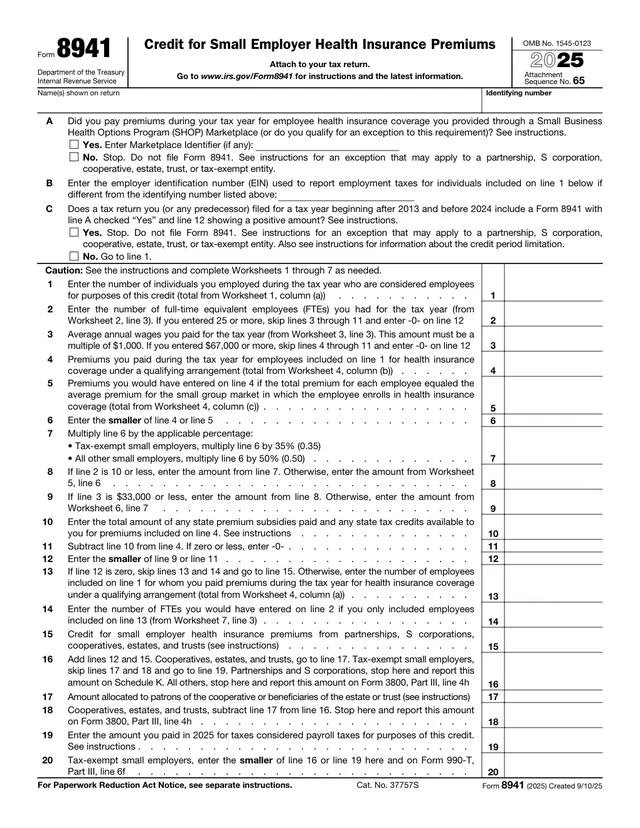
Credit for Small Employer Health Insurance Premiums
Attach to your tax return.
Go to www.irs.gov/Form8941 for instructions and the latest information.
2025
Attachment
Sequence No. 65
Name(s) shown on return
Identifying number
A
Did you pay premiums during your tax year for employee health insurance coverage you provided through a Small Business
Health Options Program (SHOP) Marketplace (or do you qualify for an exception to this requirement)? See instructions.
Yes. Enter Marketplace Identifier (if any):
No. Stop. Do not file Form 8941. See instructions for an exception that may apply to a partnership, S corporation, cooperative, estate, trust, or tax-exempt entity.
B
Enter the employer identification number (EIN) used to report employment taxes for individuals included on line 1 below if different from the identifying number listed above:
C
Does a tax return you (or any predecessor) filed for a tax year beginning after 2013 and before 2024 include a Form 8941 with line A checked “Yes” and line 12 showing a positive amount? See instructions.
Yes. Stop. Do not file Form 8941. See instructions for an exception that may apply to a partnership, S corporation, cooperative, estate, trust,
How to fill it
Fill or edit this form in MePDF
- Preview page 1 to confirm the form name and revision.
- Select Fill form to answer the form one page at a time.
- Type an answer for each field; checkboxes and choices use the form’s own options.
- Preview the finished pages, then download the flattened PDF.
- The downloaded copy is image-only, so it cannot be edited as a form again.
Use the policy number and the insured's legal name exactly. The editor keeps the original layout while you fill the existing fields.