What's inside
Form content
(Rev. September 2021)
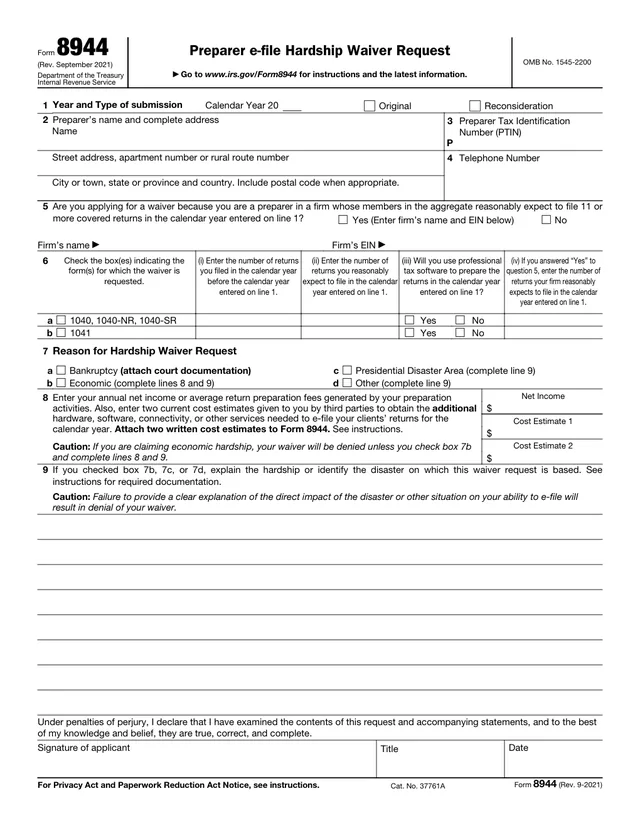
Preparer e-file Hardship Waiver Request
▶ Go to www.irs.gov/Form8944 for instructions and the latest information.
1 Year and Type of submission
Calendar Year 20
Original
Reconsideration
2 Preparer’s name and complete address
Name
Street address, apartment number or rural route number
City or town, state or province and country. Include postal code when appropriate.
3
P
Preparer Tax Identification
Number (PTIN)
4 Telephone Number
5 Are you applying for a waiver because you are a preparer in a firm whose members in the aggregate reasonably expect to file 11 or more covered returns in the calendar year entered on line 1?
Yes (Enter firm’s name and EIN below)
No
Firm’s name ▶
Firm’s EIN ▶
6
Check the box(es) indicating the form(s) for which the waiver is requested.
(i) Enter the number of returns you filed in the calendar year before the calendar year entered on line 1.
(ii) Enter the number of returns you reasonably expect to file in the calendar year entered on line 1.
(iii) Will you use professional tax software to prepare the returns in the calendar year entered on line 1?
(iv) If you answered “Yes” to question 5, enter the number of returns your firm reasonab
How to fill it
Fill or edit this form in MePDF
- Preview page 1 to confirm the form name and revision.
- Select Fill form to answer the form one page at a time.
- Type an answer for each field; checkboxes and choices use the form’s own options.
- Preview the finished pages, then download the flattened PDF.
- The downloaded copy is image-only, so it cannot be edited as a form again.
Keep the tax year and filing status consistent on every page. The editor keeps the original layout while you fill the existing fields.