What's inside
Form content
2025
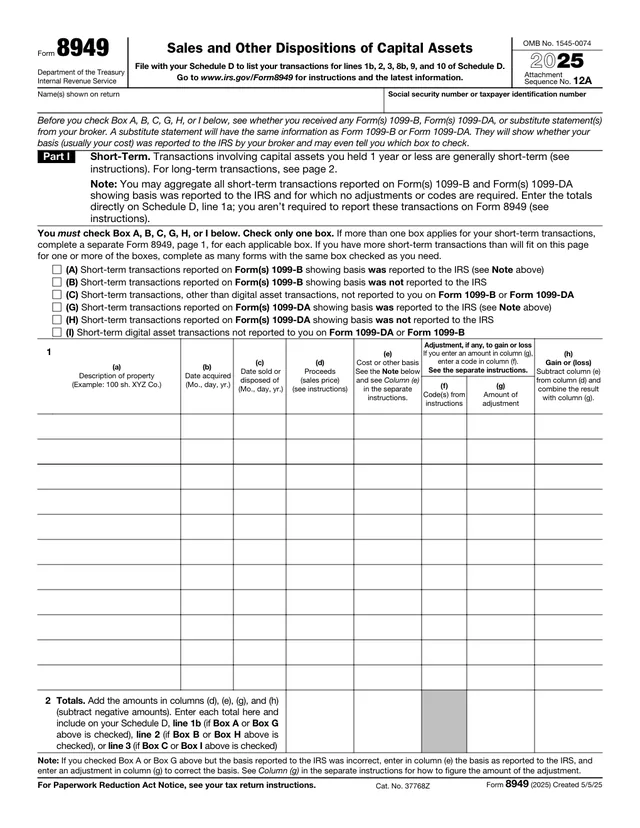
Sales and Other Dispositions of Capital Assets
File with your Schedule D to list your transactions for lines 1b, 2, 3, 8b, 9, and 10 of Schedule D.
Go to www.irs.gov/Form8949 for instructions and the latest information.
Attachment
Sequence No. 12A
Name(s) shown on return
Social security number or taxpayer identification number
Before you check Box A, B, C, G, H, or I below, see whether you received any Form(s) 1099-B, Form(s) 1099-DA, or substitute statement(s) from your broker. A substitute statement will have the same information as Form 1099-B or Form 1099-DA. They will show whether your basis (usually your cost) was reported to the IRS by your broker and may even tell you which box to check.
Part I
Short-Term. Transactions involving capital assets you held 1 year or less are generally short-term (see instructions). For long-term transactions, see page 2.
Note: You may aggregate all short-term transactions reported on Form(s) 1099-B and Form(s) 1099-DA showing basis was reported to the IRS and for which no adjustments or codes are required. Enter the totals directly on Schedule D, line 1a; you aren’t required to report these transactions on Form 8949 (see instructions).
You
How to fill it
Fill or edit this form in MePDF
- Preview page 1 to confirm the form name and revision.
- Select Fill form to answer the form one page at a time.
- Type an answer for each field; checkboxes and choices use the form’s own options.
- Preview the finished pages, then download the flattened PDF.
- The downloaded copy is image-only, so it cannot be edited as a form again.
Keep the tax year and filing status consistent on every page. The editor keeps the original layout while you fill the existing fields.