What's inside
Form content
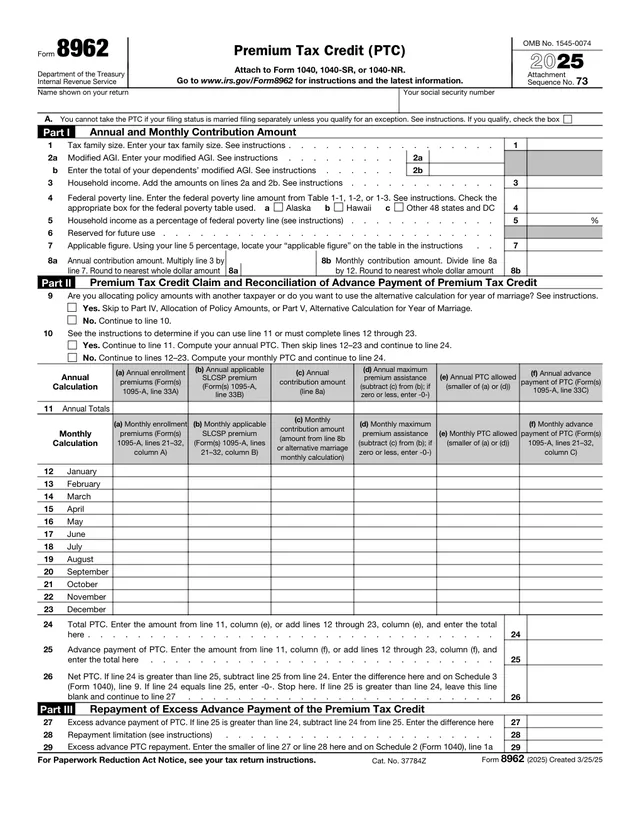
Premium Tax Credit (PTC)
Attach to Form 1040, 1040-SR, or 1040-NR.
Go to www.irs.gov/Form8962 for instructions and the latest information.
2025
Attachment
Sequence No. 73
Name shown on your return
Your social security number
A.
You cannot take the PTC if your filing status is married filing separately unless you qualify for an exception. See instructions. If you qualify, check the box
Part I
Annual and Monthly Contribution Amount
1
Tax family size. Enter your tax family size. See instructions .
.
.
.
.
.
.
.
.
.
.
.
.
.
.
.
.
1
2a
Modified AGI. Enter your modified AGI. See instructions
.
.
.
.
.
.
.
.
.
2a b
Enter the total of your dependents’ modified AGI. See instructions
.
.
.
.
.
.
2b
3
Household income. Add the amounts on lines 2a and 2b. See instructions .
.
.
.
.
.
.
.
.
.
.
.
3
4
Federal poverty line. Enter the federal poverty line amount from Table 1-1, 1-2, or 1-3. See instructions. Check the appropriate box for the federal poverty table used.
a
Alaska b
Hawaii c
Other 48 states and DC
4
5
Household income as a percentage of federal poverty line (see instructions) .
.
.
.
.
.
.
.
.
.
.
.
5
%
6
Reserved for future use
.
.
.
.
.
.
.
.
.
.
.
.
.
.
.
.
.
.
.
.
.
.
.
.
.
.
.
7
How to fill it
Fill or edit this form in MePDF
- Preview page 1 to confirm the form name and revision.
- Select Fill form to answer the form one page at a time.
- Type an answer for each field; checkboxes and choices use the form’s own options.
- Preview the finished pages, then download the flattened PDF.
- The downloaded copy is image-only, so it cannot be edited as a form again.
Keep the tax year and filing status consistent on every page. The editor keeps the original layout while you fill the existing fields.