What's inside
Form content
2025
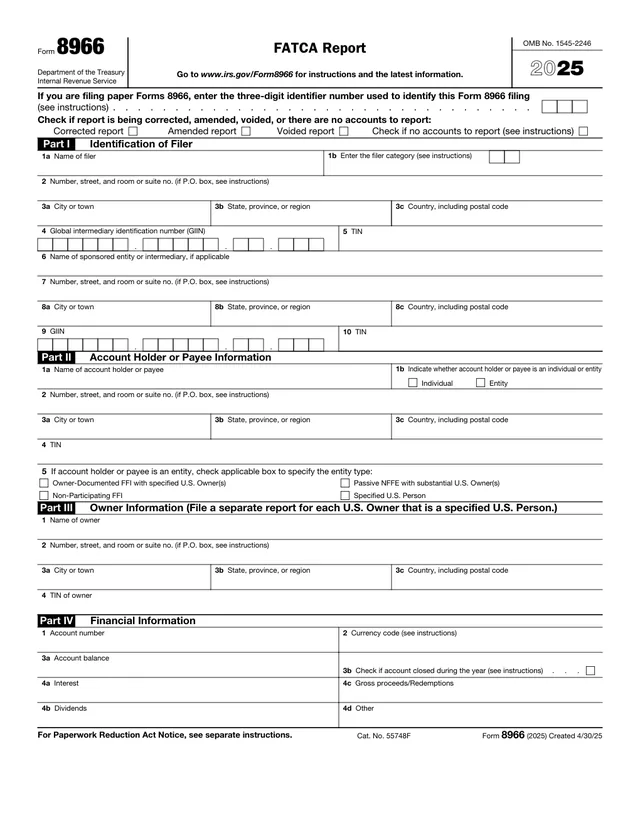
FATCA Report
Go to www.irs.gov/Form8966 for instructions and the latest information.
If you are filing paper Forms 8966, enter the three-digit identifier number used to identify this Form 8966 filing
(see instructions) .
.
.
.
.
.
.
.
.
.
.
.
.
.
.
.
.
.
.
.
.
.
.
.
.
.
.
.
.
.
.
.
.
.
Check if report is being corrected, amended, voided, or there are no accounts to report:
Corrected report
Amended report
Voided report
Check if no accounts to report (see instructions)
Part I
Identification of Filer
1a Name of filer
1b Enter the filer category (see instructions)
2 Number, street, and room or suite no. (if P.O. box, see instructions)
3a City or town
3b State, province, or region
3c Country, including postal code
4 Global intermediary identification number (GIIN)
.
.
.
5 TIN
6 Name of sponsored entity or intermediary, if applicable
7 Number, street, and room or suite no. (if P.O. box, see instructions)
8a City or town
8b State, province, or region
8c Country, including postal code
9 GIIN
.
.
.
10 TIN
Part II
Account Holder or Payee Information
1a Name of account holder or payee
1b Indicate whether account holder or payee is an individual or entity
Individual
Entity
2 Number, stree
How to fill it
Fill or edit this form in MePDF
- Preview page 1 to confirm the form name and revision.
- Select Fill form to answer the form one page at a time.
- Type an answer for each field; checkboxes and choices use the form’s own options.
- Preview the finished pages, then download the flattened PDF.
- The downloaded copy is image-only, so it cannot be edited as a form again.
Copy figures exactly from the statement and keep the currency clear. The editor keeps the original layout while you fill the existing fields.