What's inside
Form content
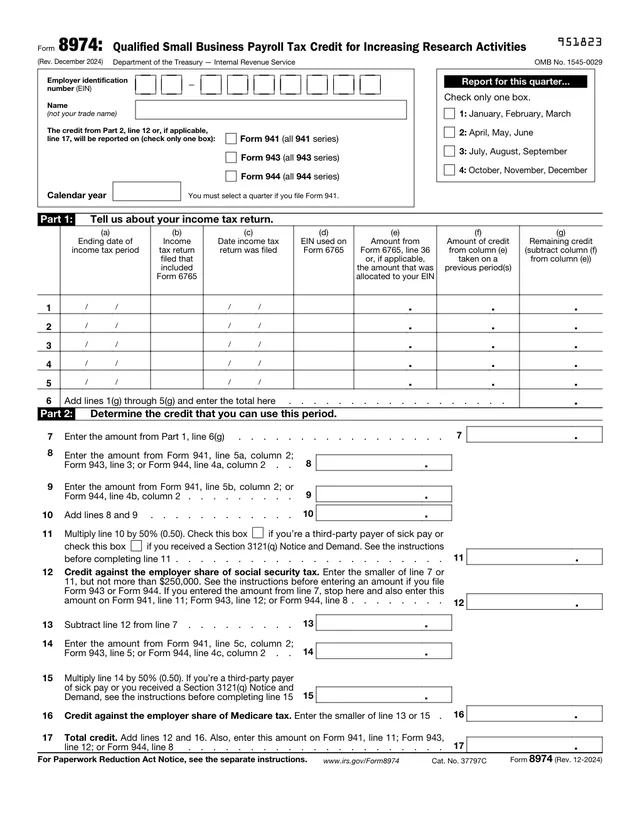
Form 8974:
(Rev. December 2024)
Qualified Small Business Payroll Tax Credit for Increasing Research Activities
951823
Employer identification number (EIN)
—
Name
(not your trade name)
The credit from Part 2, line 12 or, if applicable, line 17, will be reported on (check only one box):
Form 941 (all 941 series)
Form 943 (all 943 series)
Form 944 (all 944 series)
Calendar year
You must select a quarter if you file Form 941.
Report for this quarter...
Check only one box.
1: January, February, March
2: April, May, June
3: July, August, September
4: October, November, December
Part 1:
Tell us about your income tax return.
(a)
Ending date of income tax period
(b)
Income tax return filed that included
(c)
Date income tax return was filed
(d)
EIN used on
(e)
Amount from
Form 6765, line 36 or, if applicable, the amount that was allocated to your EIN
(f)
Amount of credit from column (e) taken on a previous period(s)
(g)
Remaining credit
(subtract column (f) from column (e))
1
/
/
/
/
.
.
.
2
/
/
/
/
.
.
.
3
/
/
/
/
.
.
.
4
/
/
/
/
.
.
.
5
/
/
/
/
.
.
.
6
Add lines 1(g) through 5(g) and enter the total here
.
.
.
.
.
.
.
.
.
.
.
.
.
.
.
.
.
.
.
Part 2:
Determine the credit that you can use th
How to fill it
Fill or edit this form in MePDF
- Preview page 1 to confirm the form name and revision.
- Select Fill form to answer the form one page at a time.
- Type an answer for each field; checkboxes and choices use the form’s own options.
- Preview the finished pages, then download the flattened PDF.
- The downloaded copy is image-only, so it cannot be edited as a form again.
Keep the tax year and filing status consistent on every page. The editor keeps the original layout while you fill the existing fields.