What's inside
Form content
(December 2018)
Partnership Representative Revocation, Designation, and Resignation
▶ Go to www.irs.gov/Form8979 for instructions and the latest information.
Type or
Print
Name of Partnership
Employer identification number
Number, street, and room or suite no. If a P.O. box, see instructions.
City or town, state, and ZIP code. If a foreign address, enter city, province or state, postal code, and country. Follow the country’s practice for entering the postal code.
Tax Year Ending
/
/
Check here if this form is being filed with an Administrative Adjustment Request (Form 8082 or Form 1065X)
.
.
.
.
▶
Part I
Reason for Filing
The person signing this form affirmatively states that (check applicable boxes):
1
The partnership is revoking (check box 1a, 1b, or 1c):
a
The entity partnership representative and (check box 1a(i) or 1a(ii)):
i
Designating an entity partnership representative and appointing a designated individual. Complete
Part II, Section A and Part III, Section A. Sign Part IV, Section A.
ii
Designating an individual partnership representative. Complete Part II, Section A and Part III, Section B.
Sign Part IV, Section A.
b
The individual partnership representative and (check
How to fill it
Fill or edit this form in MePDF
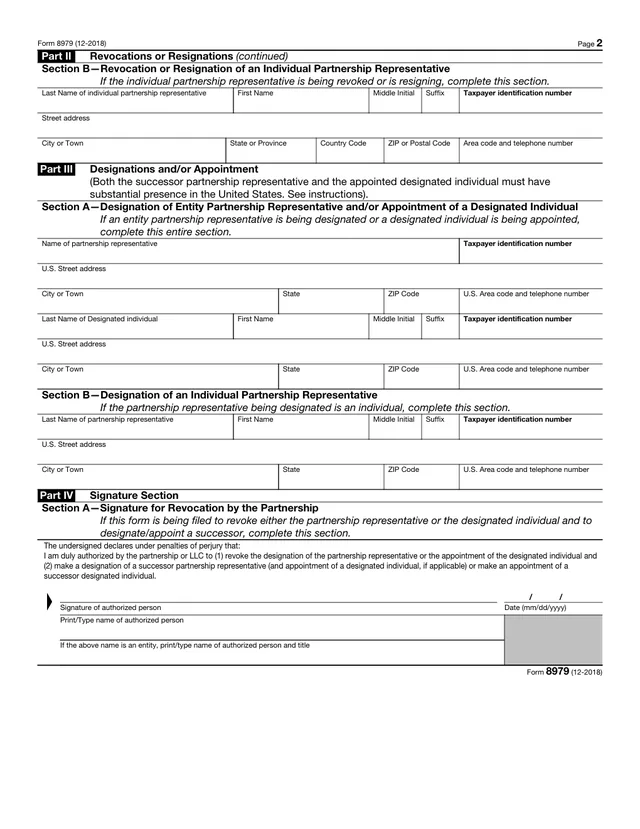
- Preview page 2 to confirm the form name and revision.
- Select Fill form to answer the form one page at a time.
- Type an answer for each field; checkboxes and choices use the form’s own options.
- Preview the finished pages, then download the flattened PDF.
- The downloaded copy is image-only, so it cannot be edited as a form again.
Keep the tax year and filing status consistent on every page. The editor keeps the original layout while you fill the existing fields.