What's inside
Form content
2025
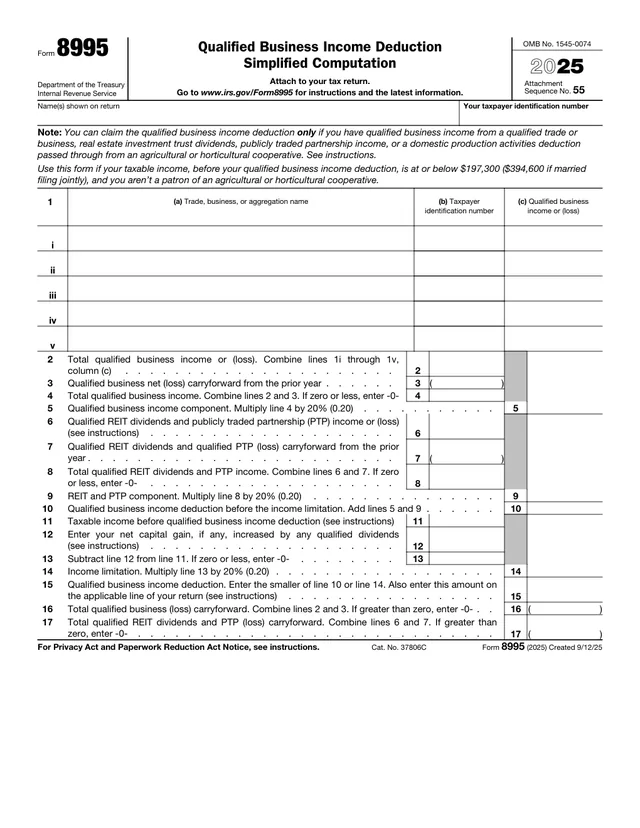
Qualified Business Income Deduction
Simplified Computation
Attach to your tax return.
Go to www.irs.gov/Form8995 for instructions and the latest information.
Attachment
Sequence No. 55
Name(s) shown on return
Your taxpayer identification number
Note: You can claim the qualified business income deduction only if you have qualified business income from a qualified trade or business, real estate investment trust dividends, publicly traded partnership income, or a domestic production activities deduction passed through from an agricultural or horticultural cooperative. See instructions.
Use this form if your taxable income, before your qualified business income deduction, is at or below $197,300 ($394,600 if married filing jointly), and you aren’t a patron of an agricultural or horticultural cooperative.
1
(a) Trade, business, or aggregation name
(b) Taxpayer identification number
(c) Qualified business income or (loss) i ii iii iv v
2
Total qualified business income or (loss). Combine lines 1i through 1v, column (c)
.
.
.
.
.
.
.
.
.
.
.
.
.
.
.
.
.
.
.
.
.
.
2
3
Qualified business net (loss) carryforward from the prior year .
.
.
.
.
.
3
( )
4
Total qualified business income. Co
How to fill it
Fill or edit this form in MePDF
- Preview page 1 to confirm the form name and revision.
- Select Fill form to answer the form one page at a time.
- Type an answer for each field; checkboxes and choices use the form’s own options.
- Preview the finished pages, then download the flattened PDF.
- The downloaded copy is image-only, so it cannot be edited as a form again.
Keep the tax year and filing status consistent on every page. The editor keeps the original layout while you fill the existing fields.