What's inside
Form content
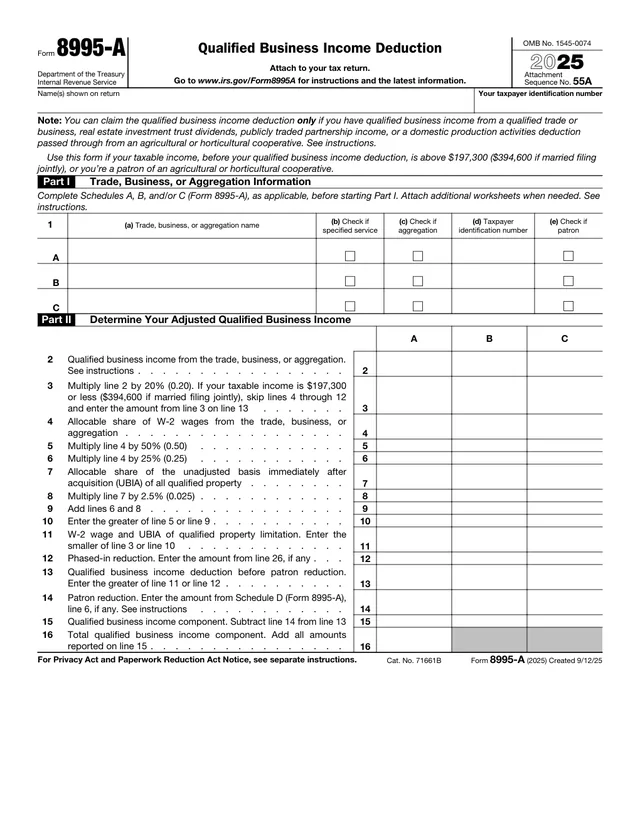
2025
Qualified Business Income Deduction
Attach to your tax return.
Go to www.irs.gov/Form8995A for instructions and the latest information.
Attachment
Sequence No. 55A
Name(s) shown on return
Your taxpayer identification number
Note: You can claim the qualified business income deduction only if you have qualified business income from a qualified trade or business, real estate investment trust dividends, publicly traded partnership income, or a domestic production activities deduction passed through from an agricultural or horticultural cooperative. See instructions.
Use this form if your taxable income, before your qualified business income deduction, is above $197,300 ($394,600 if married filing jointly), or you’re a patron of an agricultural or horticultural cooperative.
Part I
Trade, Business, or Aggregation Information
Complete Schedules A, B, and/or C (Form 8995-A), as applicable, before starting Part I. Attach additional worksheets when needed. See instructions.
1
(a) Trade, business, or aggregation name
(b) Check if specified service
(c) Check if aggregation
(d) Taxpayer identification number
(e) Check if patron
A
B
C
Part II
Determine Your Adjusted Qualified Business Incom
How to fill it
Fill or edit this form in MePDF
- Preview page 1 to confirm the form name and revision.
- Select Fill form to answer the form one page at a time.
- Type an answer for each field; checkboxes and choices use the form’s own options.
- Preview the finished pages, then download the flattened PDF.
- The downloaded copy is image-only, so it cannot be edited as a form again.
Keep the tax year and filing status consistent on every page. The editor keeps the original layout while you fill the existing fields.