What's inside
Form content
2025
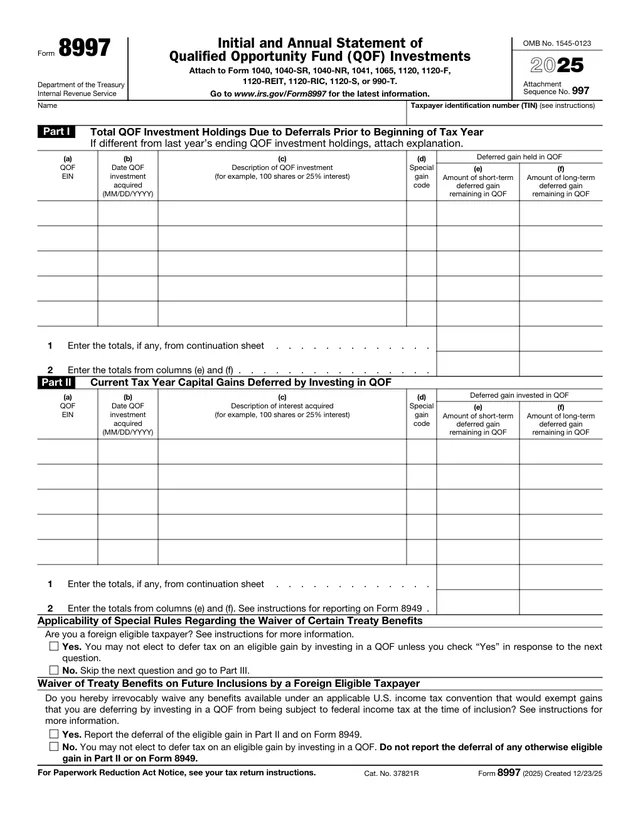
Initial and Annual Statement of
Qualified Opportunity Fund (QOF) Investments
Attach to Form 1040, 1040-SR, 1040-NR, 1041, 1065, 1120, 1120-F,
1120-REIT, 1120-RIC, 1120-S, or 990-T.
Go to www.irs.gov/Form8997 for the latest information.
Attachment
Sequence No. 997
Name
Taxpayer identification number (TIN) (see instructions)
Part I
Total QOF Investment Holdings Due to Deferrals Prior to Beginning of Tax Year
If different from last year’s ending QOF investment holdings, attach explanation.
(a)
QOF
EIN
(b)
Date QOF investment acquired
(MM/DD/YYYY)
(c)
Description of QOF investment
(for example, 100 shares or 25% interest)
(d)
Special gain code
Deferred gain held in QOF
(e)
Amount of short-term deferred gain remaining in QOF
(f)
Amount of long-term deferred gain remaining in QOF
1
Enter the totals, if any, from continuation sheet
.
.
.
.
.
.
.
.
.
.
.
.
.
2
Enter the totals from columns (e) and (f) .
.
.
.
.
.
.
.
.
.
.
.
.
.
.
.
Part II
Current Tax Year Capital Gains Deferred by Investing in QOF
(a)
QOF
EIN
(b)
Date QOF investment acquired
(MM/DD/YYYY)
(c)
Description of interest acquired
(for example, 100 shares or 25% interest)
(d)
Special gain code
Deferred gain invested in QOF
How to fill it
Fill or edit this form in MePDF
- Preview page 1 to confirm the form name and revision.
- Select Fill form to answer the form one page at a time.
- Type an answer for each field; checkboxes and choices use the form’s own options.
- Preview the finished pages, then download the flattened PDF.
- The downloaded copy is image-only, so it cannot be edited as a form again.
Keep the tax year and filing status consistent on every page. The editor keeps the original layout while you fill the existing fields.