What's inside
Form content
(Rev. October 2016)
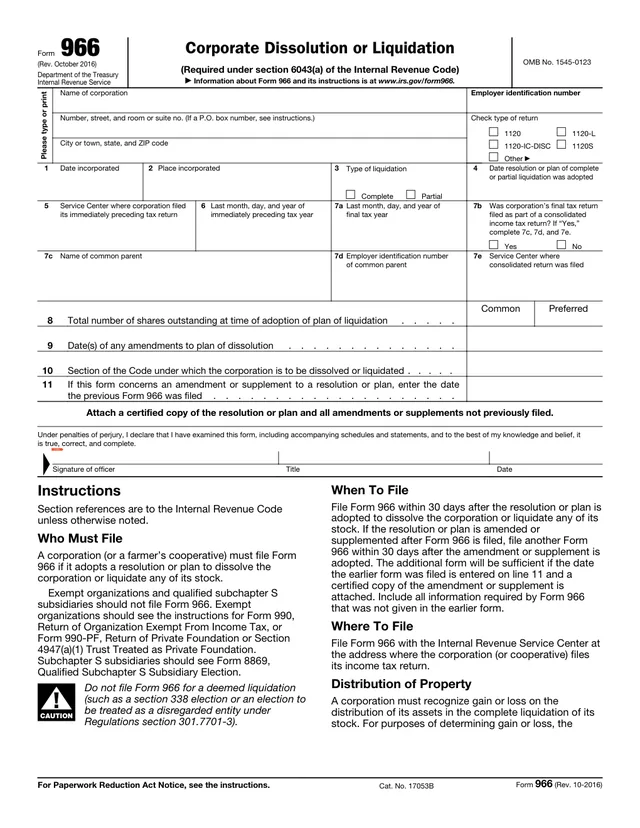
Corporate Dissolution or Liquidation
(Required under section 6043(a) of the Internal Revenue Code)
▶ Information about Form 966 and its instructions is at www.irs.gov/form966.
Please type or print
Name of corporation
Number, street, and room or suite no. (If a P.O. box number, see instructions.)
City or town, state, and ZIP code
Employer identification number
Check type of return
1120
1120-L
1120-IC-DISC
1120S
Other ▶
1
Date incorporated
2 Place incorporated
3
Type of liquidation
Complete
Partial
4
Date resolution or plan of complete or partial liquidation was adopted
5
Service Center where corporation filed its immediately preceding tax return
6 Last month, day, and year of immediately preceding tax year
7a Last month, day, and year of final tax year
7b
Was corporation’s final tax return filed as part of a consolidated income tax return? If “Yes,” complete 7c, 7d, and 7e.
Yes
No
7c
Name of common parent
7d Employer identification number of common parent
7e
Service Center where consolidated return was filed
8
Total number of shares outstanding at time of adoption of plan of liquidation
.
.
.
.
.
Common
Preferred
9
Date(s) of any amendments to plan of dissolution
How to fill it
Fill or edit this form in MePDF
- Preview page 1 to confirm the form name and revision.
- Select Fill form to answer the form one page at a time.
- Type an answer for each field; checkboxes and choices use the form’s own options.
- Preview the finished pages, then download the flattened PDF.
- The downloaded copy is image-only, so it cannot be edited as a form again.
Keep the tax year and filing status consistent on every page. The editor keeps the original layout while you fill the existing fields.