What's inside
Form content
(Form 990)
Public Charity Status and Public Support
Complete if the organization is a section 501(c)(3) organization or a section 4947(a)(1) nonexempt charitable trust.
Attach to Form 990 or Form 990-EZ.
Go to www.irs.gov/Form990 for instructions and the latest information.
2025
Open to Public
Inspection
Name of the organization
Employer identification number
Part I
Reason for Public Charity Status. (All organizations must complete this part.) See instructions.
The organization is not a private foundation because it is: (For lines 1 through 12, check only one box.)
1
A church, convention of churches, or association of churches described in section 170(b)(1)(A)(i).
2
A school described in section 170(b)(1)(A)(ii). (Attach Schedule E (Form 990).)
3
A hospital or a cooperative hospital service organization described in section 170(b)(1)(A)(iii).
4
A medical research organization operated in conjunction with a hospital described in section 170(b)(1)(A)(iii). Enter the hospital’s name, city, and state:
5
An organization operated for the benefit of a college or university owned or operated by a governmental unit described in section 170(b)(1)(A)(iv). (Complete Part II.)
6
A federal, stat
How to fill it
Fill or edit this form in MePDF
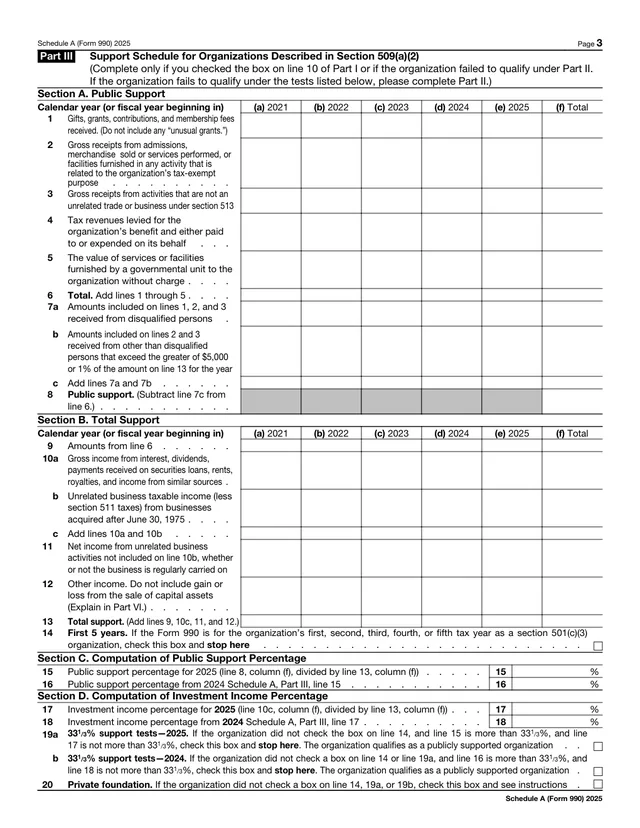
- Preview page 3 to confirm the form name and revision.
- Select Fill form to answer the form one page at a time.
- Type an answer for each field; checkboxes and choices use the form’s own options.
- Preview the finished pages, then download the flattened PDF.
- The downloaded copy is image-only, so it cannot be edited as a form again.
Keep the tax year and filing status consistent on every page. The editor keeps the original layout while you fill the existing fields.