What's inside
Form content
(Form 990)
2025
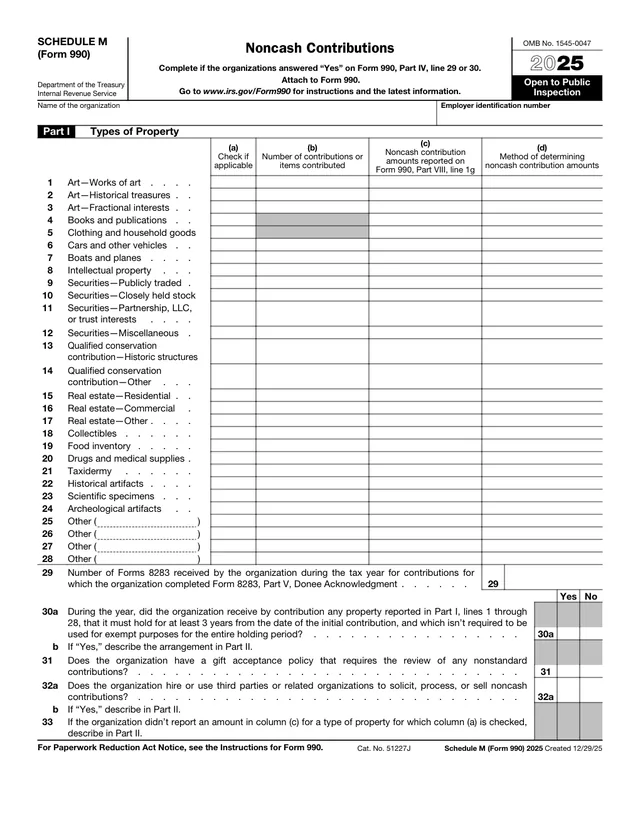
Noncash Contributions
Complete if the organizations answered “Yes” on Form 990, Part IV, line 29 or 30.
Attach to Form 990.
Go to www.irs.gov/Form990 for instructions and the latest information.
Open to Public
Inspection
Name of the organization
Employer identification number
Part I
Types of Property
(a)
Check if applicable
(b)
Number of contributions or items contributed
(c)
Noncash contribution amounts reported on
Form 990, Part VIII, line 1g
(d)
Method of determining noncash contribution amounts
1
Art—Works of art .
.
.
.
2
Art—Historical treasures .
.
3
Art—Fractional interests .
.
4
Books and publications .
.
5
Clothing and household goods
6
Cars and other vehicles .
.
7
Boats and planes .
.
.
.
8
Intellectual property
.
.
.
9
Securities—Publicly traded .
10
Securities—Closely held stock
11
Securities—Partnership, LLC, or trust interests
.
.
.
.
12
Securities—Miscellaneous .
13
Qualified conservation contribution—Historic structures
14
Qualified conservation contribution—Other
.
.
.
15
Real estate—Residential .
.
16
Real estate—Commercial
.
17
Real estate—Other .
.
.
.
18
Collectibles .
.
.
.
.
.
19
Food inventory .
.
.
.
.
20
Drugs and medical supplies .
21
Ta
How to fill it
Fill or edit this form in MePDF
- Preview page 1 to confirm the form name and revision.
- Select Fill form to answer the form one page at a time.
- Type an answer for each field; checkboxes and choices use the form’s own options.
- Preview the finished pages, then download the flattened PDF.
- The downloaded copy is image-only, so it cannot be edited as a form again.
Keep the tax year and filing status consistent on every page. The editor keeps the original layout while you fill the existing fields.