What's inside
Form content
Protected B when completed
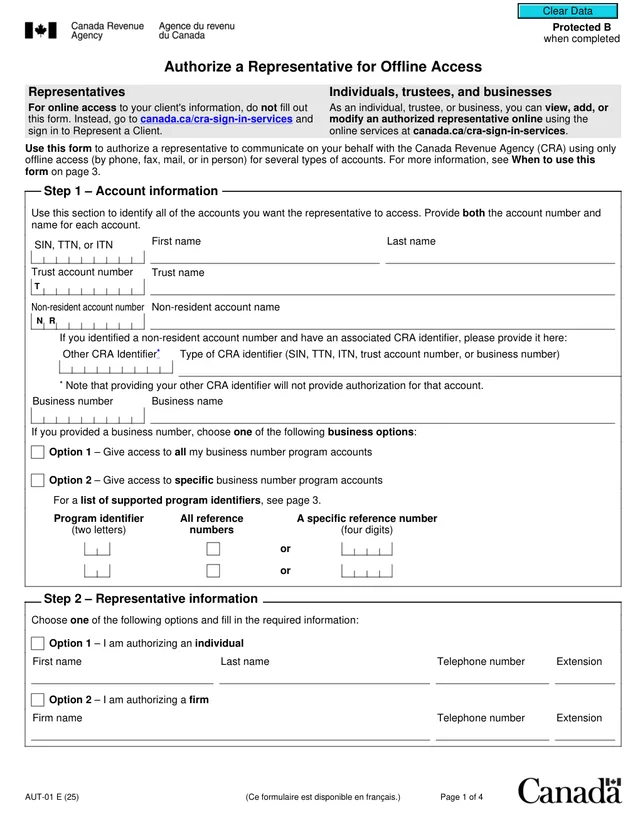
Authorize a Representative for Offline Access
Representatives
For online access to your client's information, do not fill out this form. Instead, go to canada.ca/cra-sign-in-services and sign in to Represent a Client.
Individuals, trustees, and businesses
As an individual, trustee, or business, you can view, add, or modify an authorized representative online using the online services at canada.ca/cra-sign-in-services.
Use this form to authorize a representative to communicate on your behalf with the Canada Revenue Agency (CRA) using only offline access (by phone, fax, mail, or in person) for several types of accounts. For more information, see When to use this form on page 3.
Step 1 – Account information
Use this section to identify all of the accounts you want the representative to access. Provide both the account number and name for each account.
SIN, TTN, or ITN
First name
Last name
Trust account number
Trust name
Non-resident account number Non-resident account name
If you identified a non-resident account number and have an associated CRA identifier, please provide it here:
Other CRA Identifier*
Type of CRA identifier (SIN, TTN, ITN, trust account nu
How to fill it
Fill or edit this form in MePDF
- Preview page 1 to confirm the form name and revision.
- Select Fill form to answer the form one page at a time.
- Type an answer for each field; checkboxes and choices use the form’s own options.
- Preview the finished pages, then download the flattened PDF.
- The downloaded copy is image-only, so it cannot be edited as a form again.
Keep the tax year and filing status consistent on every page. The editor keeps the original layout while you fill the existing fields.