What's inside
Form content
YR
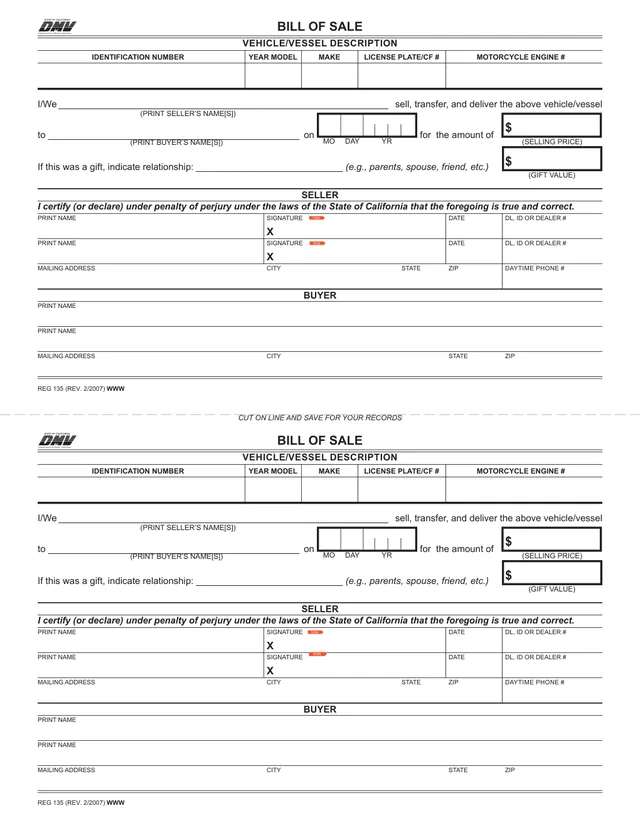
BILL OF SALE
VEHICLE/VESSEL DESCRIPTION
IDENTIFICATION NUMBER
YEAR MODEL
MAKE
LICENSE PLATE/CF #
MOTORCYCLE ENGINE #
I/We _______________________________________________________________ sell, transfer, and deliver the above vehicle/vessel
(PRINT SELLER’S NAME[S])
$ to _
_______________________________________________ on for the amount of
(PRINT BUYER’S NAME[S])
MO
DAY YR
(SELLING PRICE)
$
If this was a gift, indicate relationship: ____________________________ (e.g., parents, spouse, friend, etc.)
(GIFT VALUE)
SELLER
I certify (or declare) under penalty of perjury under the laws of the State of California that the foregoing is true and correct.
PRINT NAME
SIGNATURE
X
DATE
DL, ID OR DEALER #
PRINT NAME
SIGNATURE
X
DATE
DL, ID OR DEALER #
MAILING ADDRESS
CITY
STATE
ZIP
DAYTIME PHONE #
BUYER
PRINT NAME
PRINT NAME
MAILING ADDRESS
CITY
STATE
ZIP
REG 135 (REV. 2/2007) WWW
CUT ON LINE AND SAVE FOR YOUR RECORDS
BILL OF SALE
VEHICLE/VESSEL DESCRIPTION
IDENTIFICATION NUMBER
YEAR MODEL
MAKE
LICENSE PLATE/CF #
MOTORCYCLE ENGINE #
I/We _______________________________________________________________ sell, transfer, and deliver the above vehicle/vessel
(PRINT SELLER’S NAME[S])
$ to _
__________
How to fill it
Fill or edit this form in MePDF
- Preview page 1 to confirm the form name and revision.
- Select Fill form to answer the form one page at a time.
- Type an answer for each field; checkboxes and choices use the form’s own options.
- Preview the finished pages, then download the flattened PDF.
- The downloaded copy is image-only, so it cannot be edited as a form again.
Fill only the fields that apply and keep a copy of the finished PDF. The editor keeps the original layout while you fill the existing fields.