What's inside
Form content
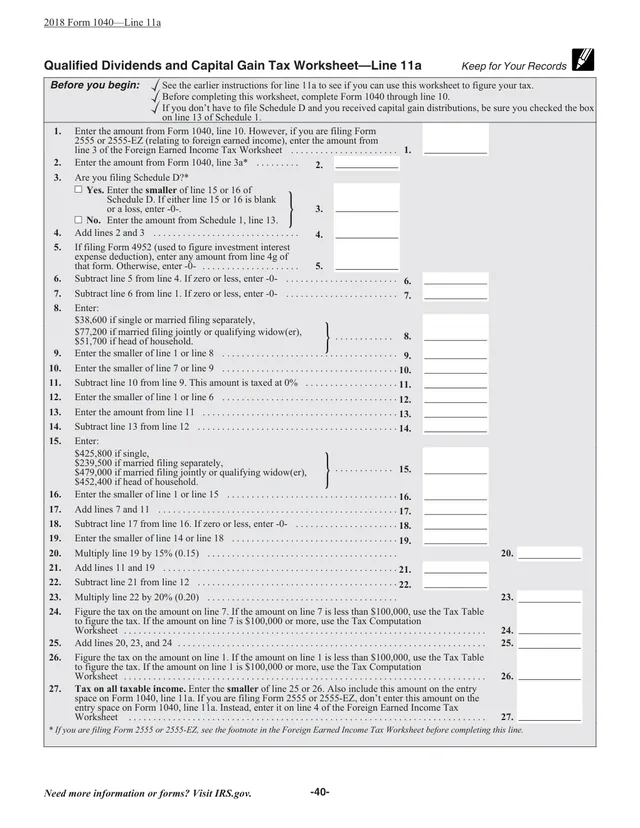
2018 Form 1040—Line 11a
Qualified Dividends and Capital Gain Tax Worksheet—Line 11a
Keep for Your Records
See the earlier instructions for line 11a to see if you can use this worksheet to figure your tax.
Before completing this worksheet, complete Form 1040 through line 10.
If you don’t have to file Schedule D and you received capital gain distributions, be sure you checked the box on line 13 of Schedule 1.
Before you begin:
1.
Enter the amount from Form 1040, line 10. However, if you are filing Form
2555 or 2555-EZ (relating to foreign earned income), enter the amount from line 3 of the Foreign Earned Income Tax Worksheet
. . . . . . . . . . . . . . . . . . . . . . 1.
2.
Enter the amount from Form 1040, line 3a*
. . . . . . . . .
2.
3.
Are you filing Schedule D?*
Yes. Enter the smaller of line 15 or 16 of
Schedule D. If either line 15 or 16 is blank or a loss, enter -0-.
3.
No. Enter the amount from Schedule 1, line 13.
4.
Add lines 2 and 3
. . . . . . . . . . . . . . . . . . . . . . . . . . . . . .
4.
5.
If filing Form 4952 (used to figure investment interest expense deduction), enter any amount from line 4g of that form. Otherwise, enter -0- . . . . . . . . . . . . . . . . . . .
How to fill it
Fill or edit this form in MePDF
- Preview page 1 to confirm the form name and revision.
- Select Fill form to answer the form one page at a time.
- Type an answer for each field; checkboxes and choices use the form’s own options.
- Preview the finished pages, then download the flattened PDF.
- The downloaded copy is image-only, so it cannot be edited as a form again.
Keep the tax year and filing status consistent on every page. The editor keeps the original layout while you fill the existing fields.