What's inside
Form content
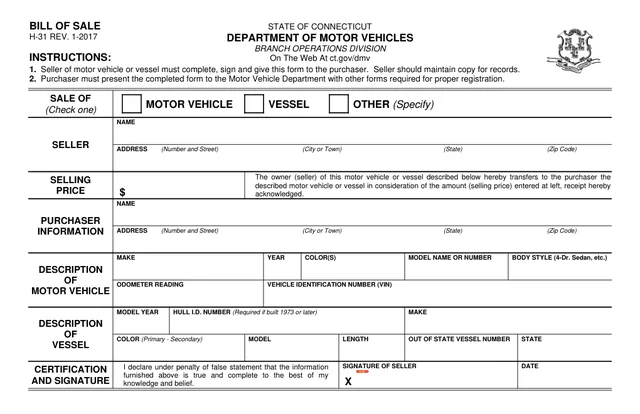
BILL OF SALE
H-31 REV. 1-2017
STATE OF CONNECTICUT
DEPARTMENT OF MOTOR VEHICLES
BRANCH OPERATIONS DIVISION
On The Web At ct.gov/dmv
INSTRUCTIONS:
1. Seller of motor vehicle or vessel must complete, sign and give this form to the purchaser. Seller should maintain copy for records.
2. Purchaser must present the completed form to the Motor Vehicle Department with other forms required for proper registration.
CERTIFICATION
AND SIGNATURE
DESCRIPTION
OF
VESSEL
DESCRIPTION
OF
MOTOR VEHICLE
PURCHASER
INFORMATION
SELLING
PRICE
SELLER
SALE OF
(Check one)
MOTOR VEHICLE
VESSEL
OTHER (Specify)
NAME
ADDRESS
(Number and Street)
(City or Town)
(State)
(Zip Code)
$
The owner (seller) of this motor vehicle or vessel described below hereby transfers to the purchaser the described motor vehicle or vessel in consideration of the amount (selling price) entered at left, receipt hereby acknowledged.
NAME
ADDRESS
(Number and Street)
(City or Town)
(State)
(Zip Code)
MAKE
YEAR
COLOR(S)
MODEL NAME OR NUMBER
BODY STYLE (4-Dr. Sedan, etc.)
ODOMETER READING
VEHICLE IDENTIFICATION NUMBER (VIN)
MODEL YEAR
DATE
SIGNATURE OF SELLER
X
MAKE
HULL I.D. NUMBER (Required if built 1973 or later)
COLOR (Primary - Secondary
How to fill it
Fill or edit this form in MePDF
- Preview page 1 to confirm the form name and revision.
- Select Fill form to answer the form one page at a time.
- Type an answer for each field; checkboxes and choices use the form’s own options.
- Preview the finished pages, then download the flattened PDF.
- The downloaded copy is image-only, so it cannot be edited as a form again.
Fill only the fields that apply and keep a copy of the finished PDF. The editor keeps the original layout while you fill the existing fields.