What's inside
Form content
c. DELETION FROM ORDERS TO
DAYS FROM ORDERS TO b. DEFERMENT OF a. REASSIGNMENT TO
DAYS AT d. PERMISSIVE ATTACHMENT OF
EFFECTIVE
5. PRO-PAY CATEGORY
6. ENL COMMITMENT
3.DOD ID NUMBER
4. RANK
9. LATEST PCS
2. NAME (Last, First, MI)
7. PMOS
8. SMOS
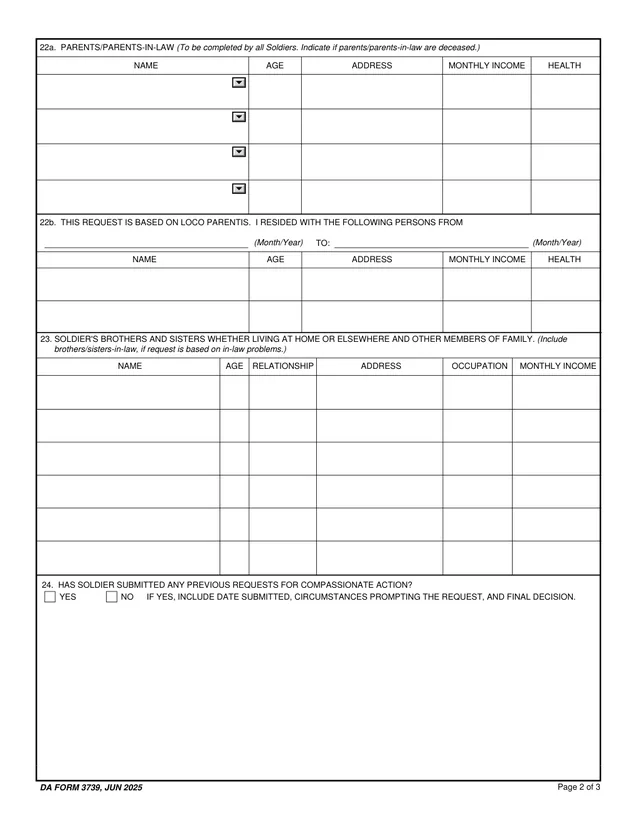
APPLICATION FOR COMPASSIONATE ACTIONS
For use of this form, see AR 614-200; the proponent agency is DCS, G-1.
DATA REQUIRED BY THE PRIVACY ACT OF 1974
FORWARD APPLICATION TO HRC (AHRC-EPO-A). SUBMIT ONE COPY ONLY. The Soldier is advised that if this request for compassionate action is approved, he/she may be assigned to duties in other than PMOS; further, a waiver of any enlistment/reenlistment commitment must be accomplished (AR 601-210, chapter 8 and AR 601-280, chapter 4). If submitted by Soldier on leave, DDALV or in attached status, a copy of DA Form 31 or orders must be included with this request.
1. I REQUEST:
DA FORM 3739, JUN 2025
APD AEM v1.00ES
11a. ASG/ATCH UNIT
11b. PHONE NO.
10. CURRENT STATUS
DUTY
ATCH
DDALV
ORDINARY LEAVE
EMERGENCY LEAVE
PREVIOUS EDITIONS ARE OBSOLETE.
AGE
NAME
ADDRESS
RELATIONSHIP
12. DEROS
20. HOME PHONE NO. (Include area code)
13. DROS
19. ETS
17. BASD
18. PEBD
16c. PRESENT ADDRESS OF SPOUSE
16a. NAME OF
How to fill it
Fill or edit this form in MePDF
- Preview page 2 to confirm the form name and revision.
- Select Fill form to answer the form one page at a time.
- Type an answer for each field; checkboxes and choices use the form’s own options.
- Preview the finished pages, then download the flattened PDF.
- The downloaded copy is image-only, so it cannot be edited as a form again.
Fill only the fields that apply and keep a copy of the finished PDF. The editor keeps the original layout while you fill the existing fields.