What's inside
Form content
DATE
NAME OF DRIVER
NAME OF EXAMINER
GCSS/DOD ID
SCORE
ROUTE
ROAD TEST SCORE SHEET
For use of this form, see AR 600-55; the proponent agency is DCS, G3/5/7.
............
..
....................................................................................
.........
............................................
........................................................
...
...................
...........................
........................................................................
............................................
..................
................................................................................
STOP/START ON GRADE
Approach
Traffic check
Signal On
Moves to proper lane
Smooth deceleration
Does not coast to stop
EXPRESSWAY
Merge On
Traffic check
Signal On
Maintains spacing
Avoids stopping
Smooth merge
Cancel signal
Stop
Lane Changes
Vehicle parallel to curb
Vehicle does not roll
Signal off/4-ways on
Parking brake on
Resume
Traffic check
Signal on
Adequate spacing
Smooth lane change
Cancel signal
Exit
Traffic check
4-ways off/signal on
Release parking brake
Did not stall engine
Traffic check
Accelerate to traffic flow
SEARCH
DIRECTION
SPEED
No erro
How to fill it
Fill or edit this form in MePDF
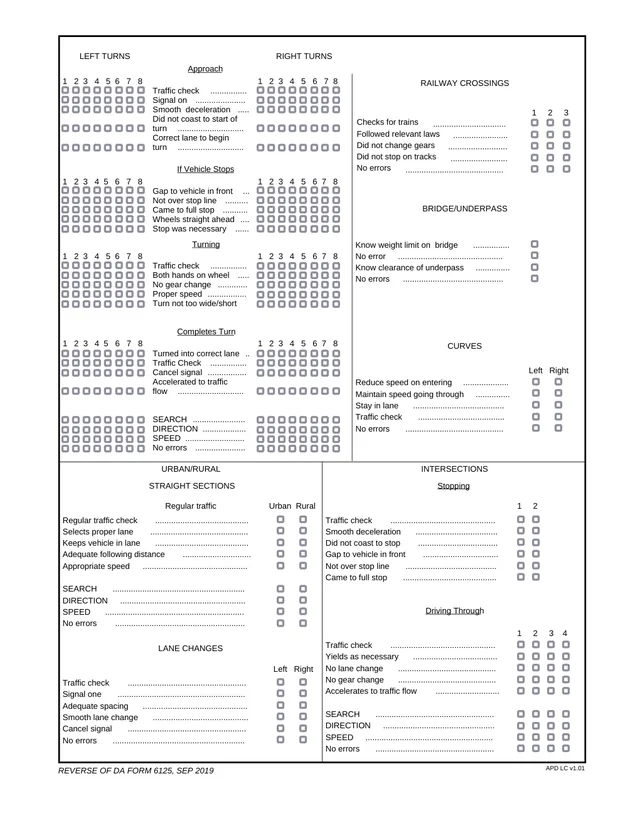
- Preview page 2 to confirm the form name and revision.
- Select Fill form to answer the form one page at a time.
- Type an answer for each field; checkboxes and choices use the form’s own options.
- Preview the finished pages, then download the flattened PDF.
- The downloaded copy is image-only, so it cannot be edited as a form again.
Fill only the fields that apply and keep a copy of the finished PDF. The editor keeps the original layout while you fill the existing fields.