What's inside
Form content
Prescribed by: DODI 6055.12
DD FORM 2214, JAN 2000
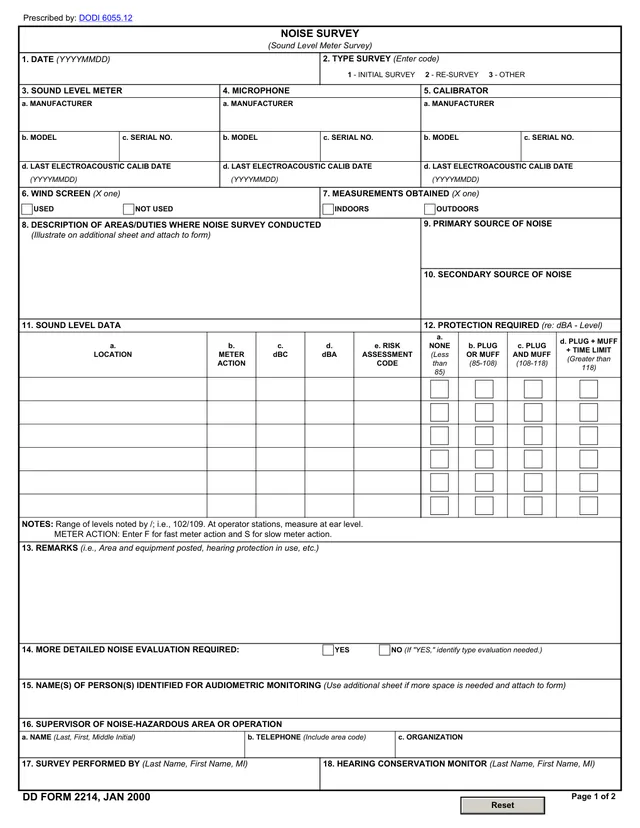
NOISE SURVEY
(Sound Level Meter Survey)
1. DATE (YYYYMMDD)
2. TYPE SURVEY (Enter code)
1 - INITIAL SURVEY 2 - RE-SURVEY 3 - OTHER
3. SOUND LEVEL METER a. MANUFACTURER b. MODEL c. SERIAL NO.
d. LAST ELECTROACOUSTIC CALIB DATE
(YYYYMMDD)
4. MICROPHONE a. MANUFACTURER b. MODEL c. SERIAL NO.
d. LAST ELECTROACOUSTIC CALIB DATE
(YYYYMMDD)
5. CALIBRATOR a. MANUFACTURER b. MODEL c. SERIAL NO.
d. LAST ELECTROACOUSTIC CALIB DATE
(YYYYMMDD)
6. WIND SCREEN (X one)
USED
NOT USED
7. MEASUREMENTS OBTAINED (X one)
INDOORS
OUTDOORS
8. DESCRIPTION OF AREAS/DUTIES WHERE NOISE SURVEY CONDUCTED
(Illustrate on additional sheet and attach to form)
9. PRIMARY SOURCE OF NOISE
10. SECONDARY SOURCE OF NOISE
11. SOUND LEVEL DATA a.
LOCATION b.
METER
ACTION c.
dBC d.
dBA e. RISK
ASSESSMENT
CODE
12. PROTECTION REQUIRED (re: dBA - Level) a.
NONE
(Less than
85) b. PLUG
OR MUFF
(85-108) c. PLUG
AND MUFF
(108-118) d. PLUG + MUFF
+ TIME LIMIT
(Greater than
118)
NOTES: Range of levels noted by /; i.e., 102/109. At operator stations, measure at ear level.
METER ACTION: Enter F for fast meter action and S for slow meter action.
13. REMARKS (i.e., Area and equipment pos
How to fill it
Fill or edit this form in MePDF
- Preview page 1 to confirm the form name and revision.
- Select Fill form to answer the form one page at a time.
- Type an answer for each field; checkboxes and choices use the form’s own options.
- Preview the finished pages, then download the flattened PDF.
- The downloaded copy is image-only, so it cannot be edited as a form again.
Fill only the fields that apply and keep a copy of the finished PDF. The editor keeps the original layout while you fill the existing fields.