What's inside
Form content
REPLACES DFAS-CL FORM 1332/5, WHICH IS OBSOLETE.
DD FORM 2864, SEP 2003
Prescribed by: DoD FMR
Controlled by: DFAS
CUI Category: PRVCY
Distribution/Dissemination Control: FEDCON
POC: [email protected]
CUI (when filled in)
CUI (when filled in)
(Updated 20250408)
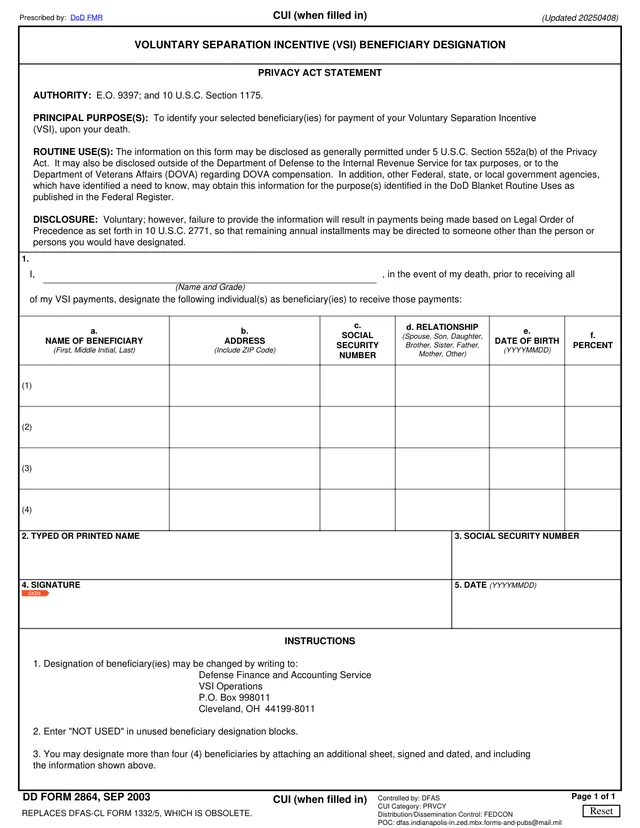
VOLUNTARY SEPARATION INCENTIVE (VSI) BENEFICIARY DESIGNATION
PRIVACY ACT STATEMENT
AUTHORITY: E.O. 9397; and 10 U.S.C. Section 1175.
PRINCIPAL PURPOSE(S): To identify your selected beneficiary(ies) for payment of your Voluntary Separation Incentive
(VSI), upon your death.
ROUTINE USE(S): The information on this form may be disclosed as generally permitted under 5 U.S.C. Section 552a(b) of the Privacy
Act. It may also be disclosed outside of the Department of Defense to the Internal Revenue Service for tax purposes, or to the
Department of Veterans Affairs (DOVA) regarding DOVA compensation. In addition, other Federal, state, or local government agencies, which have identified a need to know, may obtain this information for the purpose(s) identified in the DoD Blanket Routine Uses as published in the Federal Register.
DISCLOSURE: Voluntary; however, failure to provide the information will re
FieldsClick this Reset button to erase data from all fields.1. Enter name and grade.1. I, (Name and Grade), in the event of my death, prior to receiving all of my VSI payments, designate the following individual(s) as beneficiary(ies) to receive those payments - a. NAME OF BENEFICIARY (First, Middle Initial, Last), line 11. I, (Name and Grade), in the event of my death, prior to receiving all of my VSI payments, designate the following individual(s) as beneficiary(ies) to receive those payments - b. ADDRESS (Include ZIP Code), line 11. I, (Name and Grade), in the event of my death, prior to receiving all of my VSI payments, designate the following individual(s) as beneficiary(ies) to receive those payments - c. SOCIAL SECURITY NUMBER, line 11. I, (Name and Grade), in the event of my death, prior to receiving all of my VSI payments, designate the following individual(s) as beneficiary(ies) to receive those payments - d. RELATIONSHIP (Spouse, Son, Daughter, Brother, Sister, Father, Mother, Other), line 11. I, (Name and Grade), in the event of my death, prior to receiving all of my VSI payments, designate the following individual(s) as beneficiary(ies) to receive those payments - e. DATE OF BIRTH (YYYYMMDD), line 11. I, (Name and Grade), in the event of my death, prior to receiving all of my VSI payments, designate the following individual(s) as beneficiary(ies) to receive those payments - f. PERCENT, line 11. I, (Name and Grade), in the event of my death, prior to receiving all of my VSI payments, designate the following individual(s) as beneficiary(ies) to receive those payments - a. NAME OF BENEFICIARY (First, Middle Initial, Last), line 21. I, (Name and Grade), in the event of my death, prior to receiving all of my VSI payments, designate the following individual(s) as beneficiary(ies) to receive those payments - b. ADDRESS (Include ZIP Code), line 21. I, (Name and Grade), in the event of my death, prior to receiving all of my VSI payments, designate the following individual(s) as beneficiary(ies) to receive those payments - c. SOCIAL SECURITY NUMBER, line 21. I, (Name and Grade), in the event of my death, prior to receiving all of my VSI payments, designate the following individual(s) as beneficiary(ies) to receive those payments - d. RELATIONSHIP (Spouse, Son, Daughter, Brother, Sister, Father, Mother, Other), line 2