What's inside
Form content
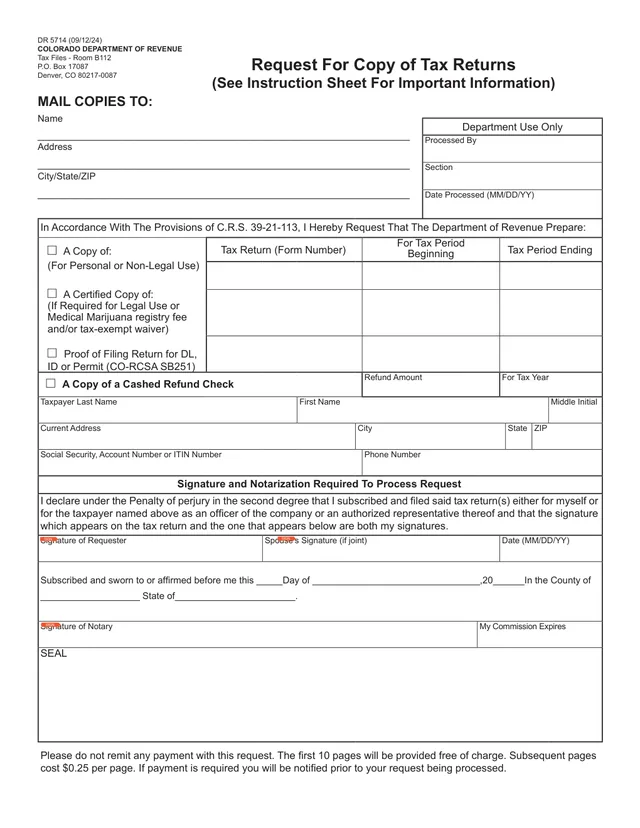
In Accordance With The Provisions of C.R.S. 39-21-113, I Hereby Request That The Department of Revenue Prepare:
A Copy of:
(For Personal or Non-Legal Use)
A Certified Copy of:
(If Required for Legal Use or
Medical Marijuana registry fee and/or tax-exempt waiver)
Proof of Filing Return for DL,
ID or Permit (CO-RCSA SB251)
Tax Return (Form Number)
For Tax Period
Beginning
Tax Period Ending
A Copy of a Cashed Refund Check
Refund Amount
For Tax Year
Taxpayer Last Name
First Name
Middle Initial
Current Address
City
State
ZIP
Social Security, Account Number or ITIN Number
Phone Number
Signature and Notarization Required To Process Request
I declare under the Penalty of perjury in the second degree that I subscribed and filed said tax return(s) either for myself or for the taxpayer named above as an officer of the company or an authorized representative thereof and that the signature which appears on the tax return and the one that appears below are both my signatures.
Signature of Requester
Spouse’s Signature (if joint)
Date (MM/DD/YY)
Subscribed and sworn to or affirmed before me this _____Day of ________________________________,20______In the County of
___________________ State of_____
How to fill it
Fill or edit this form in MePDF
- Preview page 1 to confirm the form name and revision.
- Select Fill form to answer the form one page at a time.
- Type an answer for each field; checkboxes and choices use the form’s own options.
- Preview the finished pages, then download the flattened PDF.
- The downloaded copy is image-only, so it cannot be edited as a form again.
Keep the tax year and filing status consistent on every page. The editor keeps the original layout while you fill the existing fields.