What's inside
Form content
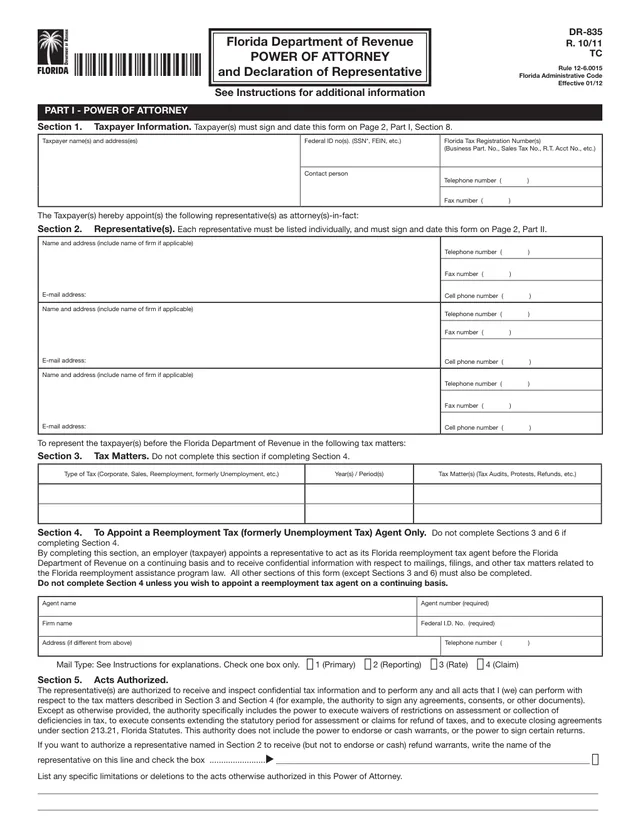
PART I - POWER OF ATTORNEY
Florida Department of Revenue
POWER OF ATTORNEY and Declaration of Representative
Section 1.
Taxpayer Information. Taxpayer(s) must sign and date this form on Page 2, Part I, Section 8.
Taxpayer name(s) and address(es)
Federal ID no(s). (SSN*, FEIN, etc.)
Florida Tax Registration Number(s)
(Business Part. No., Sales Tax No., R.T. Acct No., etc.)
Contact person
Telephone number ( )
Fax number ( )
The Taxpayer(s) hereby appoint(s) the following representative(s) as attorney(s)-in-fact:
Section 2.
Representative(s). Each representative must be listed individually, and must sign and date this form on Page 2, Part II.
Name and address (include name of firm if applicable)
E-mail address:
Telephone number ( )
Fax number ( )
Cell phone number ( )
Name and address (include name of firm if applicable)
E-mail address:
Telephone number ( )
Fax number ( )
Cell phone number ( )
Name and address (include name of firm if applicable)
E-mail address:
Telephone number ( )
Fax number ( )
Cell phone number ( )
To represent the taxpayer(s) before the Florida Department of Revenue in the following tax matters:
Section 3.
Tax Matters. Do not complete this section if completing S
How to fill it
Fill or edit this form in MePDF
- Preview page 1 to confirm the form name and revision.
- Select Fill form to answer the form one page at a time.
- Type an answer for each field; checkboxes and choices use the form’s own options.
- Preview the finished pages, then download the flattened PDF.
- The downloaded copy is image-only, so it cannot be edited as a form again.
Keep the tax year and filing status consistent on every page. The editor keeps the original layout while you fill the existing fields.