What's inside
Form content
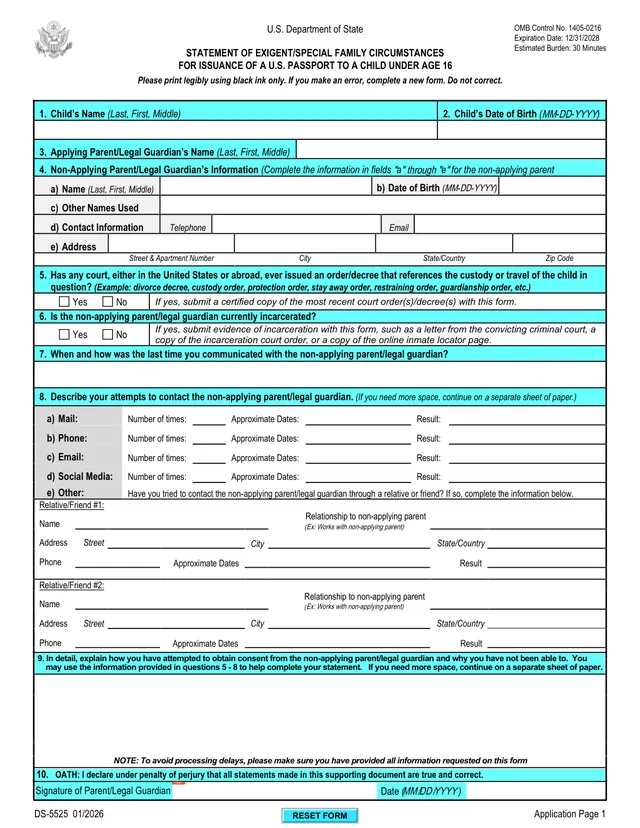
U.S. Department of State
STATEMENT OF EXIGENT/SPECIAL FAMILY CIRCUMSTANCES
FOR ISSUANCE OF A U.S. PASSPORT TO A CHILD UNDER AGE 16
Please print legibly using black ink only. If you make an error, complete a new form. Do not correct.
DS-5525 01/2026
Instruction Page 1
WHEN TO USE THIS FORM
Passport applications for children under the age of 16 require both parents/legal guardians' signatures unless a notarized, written statement of consent from the non-applying parent/legal guardian is provided. Use this form only if you cannot obtain the notarized, written consent of a parent or legal guardian with legal custody of the child applicant under 16.
Your statement in this form must explain the reason why you cannot obtain the notarized statement of consent. You must demonstrate that there are exigent or special family circumstances that make two parent/guardian consent unobtainable.
Exigent Circumstance: Your request may qualify as an exigent circumstance if there is a time-sensitive emergency, and the inability of the child to obtain a passport would jeopardize the child's health or welfare and safety or would result in the child being separated from the rest of the child's traveling
How to fill it
Fill or edit this form in MePDF
- Preview page 2 to confirm the form name and revision.
- Select Fill form to answer the form one page at a time.
- Type an answer for each field; checkboxes and choices use the form’s own options.
- Preview the finished pages, then download the flattened PDF.
- The downloaded copy is image-only, so it cannot be edited as a form again.
Spell names exactly as they appear in the passport. The editor keeps the original layout while you fill the existing fields.