What's inside
Form content
U.S. Department of State
OMB Control No. 1405-0014
Expiration Date:
Estimated Burden: 5 Minutes
DS-64
+2: 72 5(3257 $ 9$/,' /267 25 672/(1 3$663257 %22. $1' 25 &$5'
To report a valid lost or stolen passport ERRN DQG RU FDUG please choose ONE of the following options:
1.
ONLINE: Visit our website at travel.state.gov.
OR
OR
3.
BY PHONE: Call 1-877-487-2778 (TDD: 1-888-874-7793) and follow the representative's instructions. This option is not available for customers abroad.
OR
4.
BY MAIL: Submit this form AND a front and back photocopy of a government-issued photo identification (such as a driver's license or state-issued identification) to the following address ONLY IF you are NOT applying for a new U.S.
passport book and/or card:
ATTN: CLASP
U.S. Department of State
CA/PPT/S/50 &/$63
44132 Mercure Cir
P.O. Box 1227
Sterling, VA 20166-1227
* Only use this address to submit this form or other correspondence about lost/stolen passports. For general inquiries, call the
National Passport Information Center at 1-877-487-2778.
Protect yourself against identity theft! Report a lost or stolen U.S. passport!
For more information, please visit our website: travel.state.gov
:$51,1*
False statem
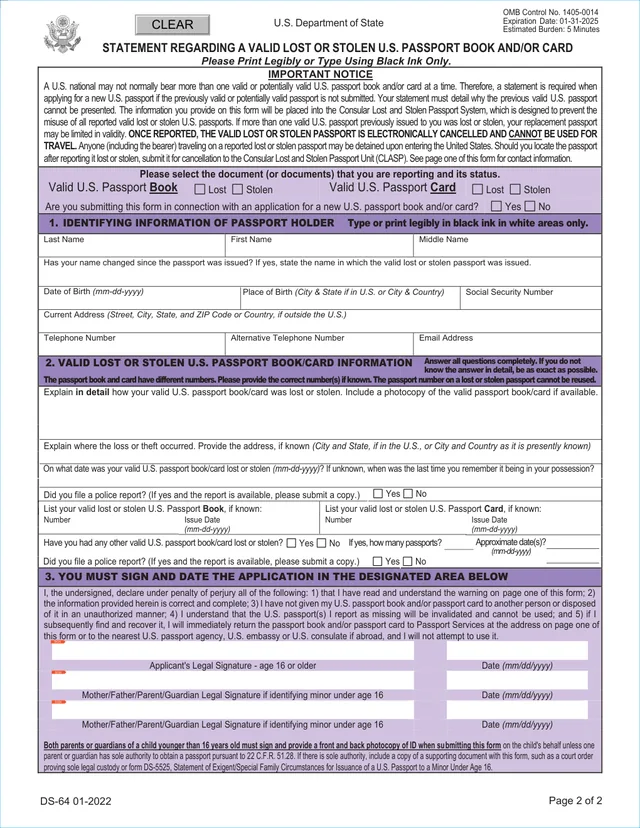
How to fill it
Fill or edit this form in MePDF
- Preview page 2 to confirm the form name and revision.
- Select Fill form to answer the form one page at a time.
- Type an answer for each field; checkboxes and choices use the form’s own options.
- Preview the finished pages, then download the flattened PDF.
- The downloaded copy is image-only, so it cannot be edited as a form again.
Spell names exactly as they appear in the passport. The editor keeps the original layout while you fill the existing fields.