What's inside
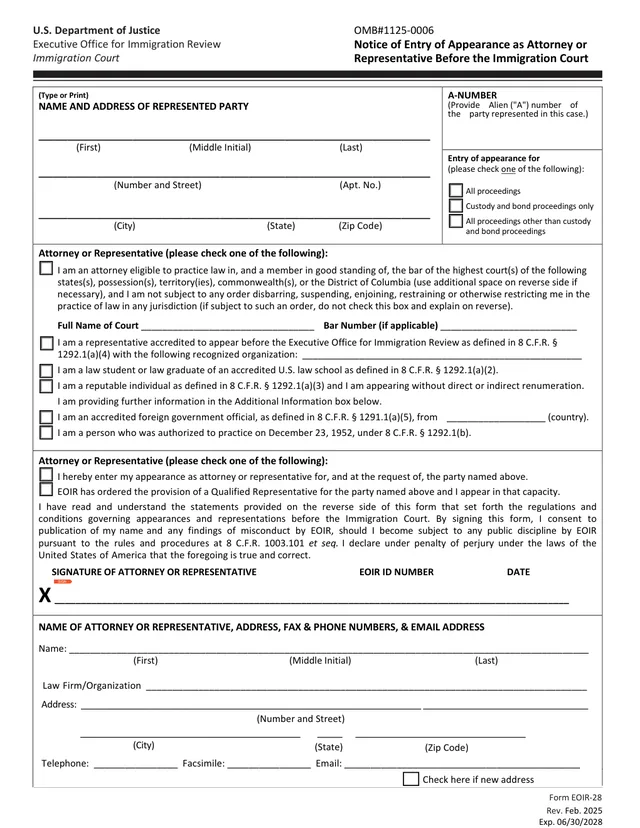
Form content
NAME AND A DDRESS OF REPRESENTED PARTY
(Zip Code)
Attorney or Representative (please check one of the following):
SIGNATURE OF ATTORNEY OR REPRESENTATIVE
EOIR ID NUMBER
DATE
X
____________________________________________________________________________________
___________________ (country).
(Middle Initial)
______________________________
___
U.S. Department of Justice
OMB#1125-0006
Executive Office for Immigration Review
Notice of Entry of Appearance as Attorney or
Immigration Court
Representative Before the Immigration Court
(Type or Print)
______________________________________________________
(First)
(Middle Initial)
(Last)
______________________________________________________
(Number and Street)
(Apt. No.)
______________________________________________________
(City)
(State
)
A-NUMBER
(Provide Alien ("A") number of the party represented in this case.)
Entry of appearance for
(please check one of the following):
All proceedings
Custody and bond proceedings only
All proceedi ngs other than custody and bond proceedings
I am an attorney eligible to practice law in, and a member in good standing of, the bar of the highest court(s ) of the following states(s), possession(s), territo
How to fill it
Fill or edit this form in MePDF
- Preview page 1 to confirm the form name and revision.
- Select Fill form to answer the form one page at a time.
- Type an answer for each field; checkboxes and choices use the form’s own options.
- Preview the finished pages, then download the flattened PDF.
- The downloaded copy is image-only, so it cannot be edited as a form again.
Spell names exactly as they appear in the passport. The editor keeps the original layout while you fill the existing fields.