What's inside
Form content
Rev. 07/2025
Exp. 07/31/2028 q q q
U.S. Department of Justice
Executive Office for Immigration Review
Board of Immigration Appeals
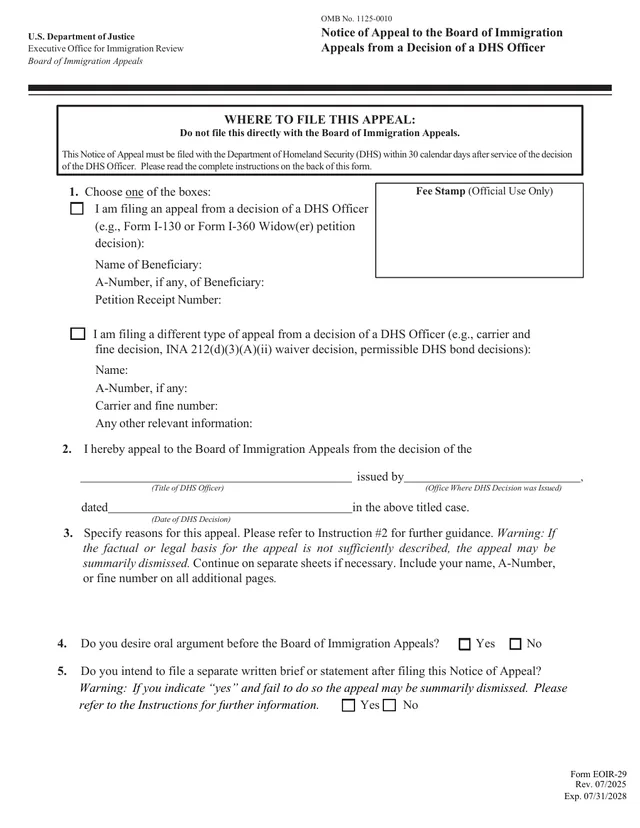
Notice of Appeal to the Board of Immigration
Appeals from a Decision of a DHS Officer
1. Choose one of the boxes:
I am filing an appeal from a decision of a DHS Officer
(e.g., Form I-130 or Form I-360 Widow(er) petition decision):
Name of Beneficiary:
A-Number, if any, of Beneficiary:
Petition Receipt Number:
I am filing a different type of appeal from a decision of a DHS Officer (e.g., carrier and fine decision, INA 212(d)(3)(A)(ii) waiver decision, permissible DHS bond decisions):
Name:
A-Number, if any:
Carrier and fine number:
Any other relevant information:
2.
I hereby appeal to the Board of Immigration Appeals from the decision of the issued by
,
(Title of DHS Officer)
(Office Where DHS Decision was Issued) dated in the above titled case.
(Date of DHS Decision)
3. Specify reasons for this appeal. Please refer to Instruction #2 for further guidance. Warning: If the factual or legal basis for the appeal is not sufficiently described, the appeal may be summarily dismissed. Continue on separate sheets if necessary. Include your name, A-Number, or fine
How to fill it
Fill or edit this form in MePDF
- Preview page 1 to confirm the form name and revision.
- Select Fill form to answer the form one page at a time.
- Type an answer for each field; checkboxes and choices use the form’s own options.
- Preview the finished pages, then download the flattened PDF.
- The downloaded copy is image-only, so it cannot be edited as a form again.
Spell names exactly as they appear in the passport. The editor keeps the original layout while you fill the existing fields.