What's inside
Form content
PERM Case Number:
FOR DEPARTMENT OF LABOR USE ONLY
Expiration Date:
Case Status:
Determination Date:
OMB Approval: 1205-0451
Expiration Date: 10/31/2025
Application for Permanent Employment Certification
U.S. Department of Labor
IMPORTANT: Please review and read the filing instructions carefully before completing the Form ETA-9089. A copy of the instructions can be found at https://www.dol.gov/agencies/eta/foreign-labor. If you are not submitting these forms electronically, please complete ALL required fields/items containing an asterisk (
* ) and any fields/items where a response is conditional and must be completed if applicable as indicated by the section ( § ) symbol.
In accordance with Federal Regulations at 20 CFR 656.17(a)(1), incomplete applications will be denied by the Department of Labor. If submitting this form non- electronically, ALL fields/items must be completed. In fields/items for which there is no answer, enter “N/A” or “0” (zero) if the field/item is a number field. If submitting this form electronically, you may leave fields/items for which there is no answer blank, and, at the end of each page, you will be asked to confirm your desire to leave these fields/ite
How to fill it
Fill or edit this form in MePDF
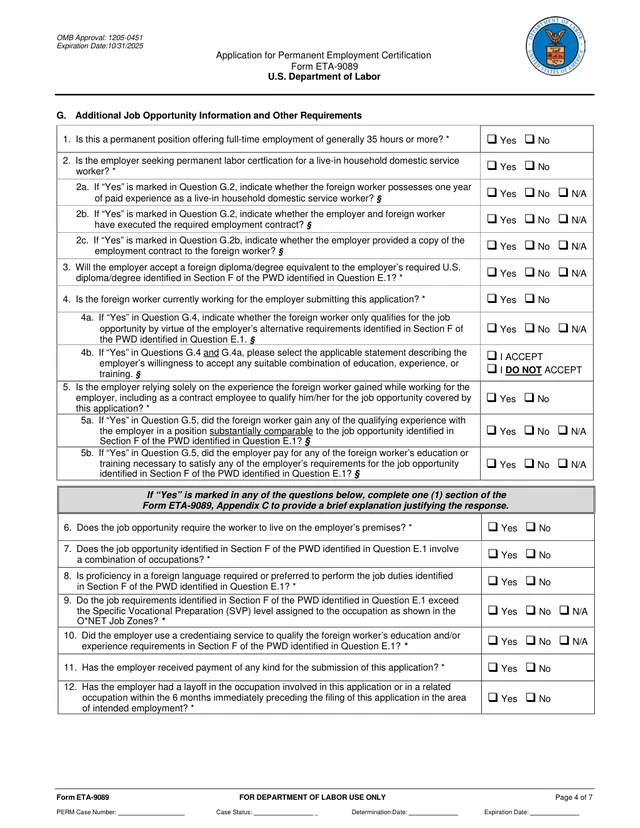
- Preview page 4 to confirm the form name and revision.
- Select Fill form to answer the form one page at a time.
- Type an answer for each field; checkboxes and choices use the form’s own options.
- Preview the finished pages, then download the flattened PDF.
- The downloaded copy is image-only, so it cannot be edited as a form again.
Match the employer's legal name and the employee's tax details. The editor keeps the original layout while you fill the existing fields.