What's inside
Form content
F A S T S T A R T
DEPOSIT
DEPOSIT
DIRECT
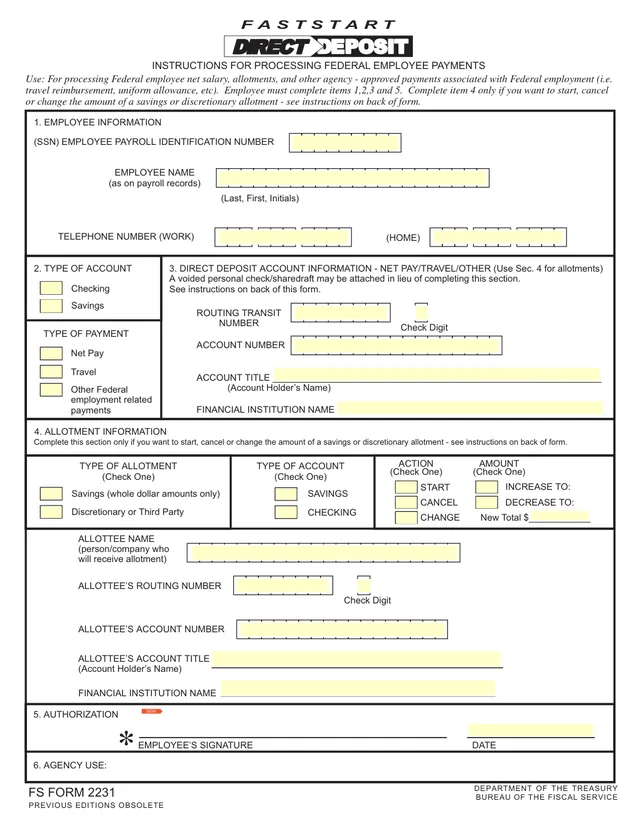
INSTRUCTIONS FOR PROCESSING FEDERAL EMPLOYEE PAYMENTS
Use: For processing Federal employee net salary, allotments, and other agency - approved payments associated with Federal employment (i.e.
travel reimbursement, uniform allowance, etc). Employee must complete items 1,2,3 and 5. Complete item 4 only if you want to start, cancel or change the amount of a savings or discretionary allotment - see instructions on back of form.
1. EMPLOYEE INFORMATION
TELEPHONE NUMBER (WORK)
ROUTING TRANSIT
NUMBER
ACCOUNT NUMBER
ACCOUNT TITLE ________________________________________________________________
(Account Holder’s Name)
FINANCIAL INSTITUTION NAME ____________________________________________________
(Last, First, Initials)
2. TYPE OF ACCOUNT
4. ALLOTMENT INFORMATION
5. AUTHORIZATION
6. AGENCY USE:
EMPLOYEE’S SIGNATURE
DATE
Complete this section only if you want to start, cancel or change the amount of a savings or discretionary allotment - see instructions on back of form.
Checking
Net Pay
Savings (whole dollar amounts only)
SAVINGS
START
INCREASE TO:
DECREASE TO:
CANCEL
CHANGE
New Total $____________
Travel
Discretionary or Third Party
CHECKING
Other
How to fill it
Fill or edit this form in MePDF
- Preview page 1 to confirm the form name and revision.
- Select Fill form to answer the form one page at a time.
- Type an answer for each field; checkboxes and choices use the form’s own options.
- Preview the finished pages, then download the flattened PDF.
- The downloaded copy is image-only, so it cannot be edited as a form again.
Copy figures exactly from the statement and keep the currency clear. The editor keeps the original layout while you fill the existing fields.