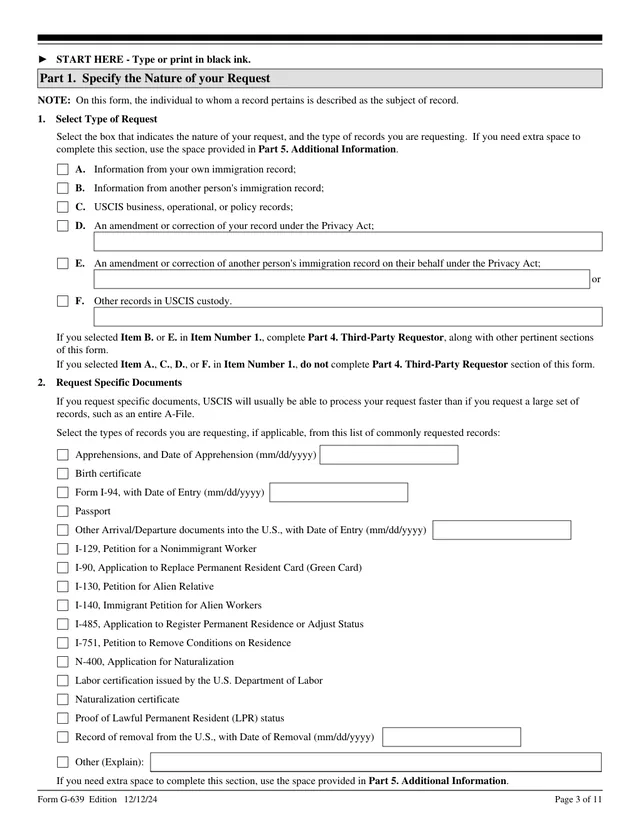
First page of Form G-639 Page 3 preview

Travel & Immigration · United States / General

Form G-639

Freedom of Information/Privacy Act Request

0Views
0Downloads
11Pages
159Fields
Fill form

Form details

Category
Travel & Immigration
Country
United States / General
Pages
11
Fields
159
Type
Fillable PDF
Added
25 Nov 2026

What's inside

Form content

Form G-639 Edition 12/12/24
Freedom of Information/Privacy Act Request
Department of Homeland Security
U.S. Citizenship and Immigration Services
USCIS
Expires 12/31/2027
What Is the Purpose of Form G-639?
Use Form G-639 to request access to U.S. Citizenship and Immigration Services (USCIS) records under the Freedom of Information
Act (FOIA) at 5 U.S.C. 552 and the Privacy Act of 1974 (PA) at 5 U.S.C. 552a, if applicable. You may also use this form to request amendment or correction of records pertaining to you under the PA, if applicable.
Your Options to Make a FOIA or PA Request with USCIS
You can make a FOIA or PA request:
• Online at www.uscis.gov/foia;
• Using this Form G-639; or
• In writing and in accordance with the requirements of the FOIA and PA.
Request and Receive Records Faster Online
Our online FOIA and PA services are a more efficient way to request and receive records than by using Form G-639 to make a request.
When you make your request online, USCIS receives it immediately and we can deliver the response to you immediately after the records are processed.
You will also be able to:
• Receive instant updates when we act on your request;
• Respond faster if we ask you

FieldsPart 1. Specify the Nature of your Request. 1. Type of Request. A. Select Information from your own immigration record;Part 1. Specify the Nature of your Request. 1. Type of Request. B. Select Information from another person's immigration record;Part 1. Specify the Nature of your Request. 1. Type of Request. C. Select USCIS business, operational, or policy records;Part 1. Specify the Nature of your Request. 1. Type of Request. D. Select An amendment or correction of your record under the Privacy Act;Part 1. Specify the Nature of your Request. 1. Type of Request. D. Select an amendment or correction of your record under the Privacy Act; Enter amendment or correction of your record.Part 1. Specify the Nature of your Request. 1. Type of Request. E. Select An amendment or correction of another person's immigration record on their behalf under the Privacy Act;Part 1. Specify the Nature of your Request. 1. Type of Request. E. Select an amendment or correction of another person's immigration record on their behalf under the Privacy Act; Enter an amendment or correction of another person's immigration record on their behalf under the Privacy Act.Part 1. Specify the Nature of your Request. 1. Type of Request. F. Select Other records in USCIS custody.Part 1. Specify the Nature of your Request. 1. Type of Request. F. Select Other records in USCIS custody. Enter Other records in USCIS custody.Part 1. Specify the Nature of your Request. 2. Request Specific Documents. Select check box for Apprehensions, and Date of Apprehension (m m/d d/y y y y).Part 1. Specify the Nature of your Request. 2. Request Specific Documents. Date of Apprehension. Enter date as 2-digit Month, 2-digit Day, and 4-digit Year.Part 1. Specify the Nature of your Request. 2. Request Specific Documents. Select check box for Birth certificate.

How to fill it

Fill or edit this form in MePDF

  1. Preview page 3 to confirm the form name and revision.
  2. Select Fill form to answer the form one page at a time.
  3. Type an answer for each field; checkboxes and choices use the form’s own options.
  4. Preview the finished pages, then download the flattened PDF.
  5. The downloaded copy is image-only, so it cannot be edited as a form again.

Spell names exactly as they appear in the passport. The editor keeps the original layout while you fill the existing fields.