What's inside
Form content
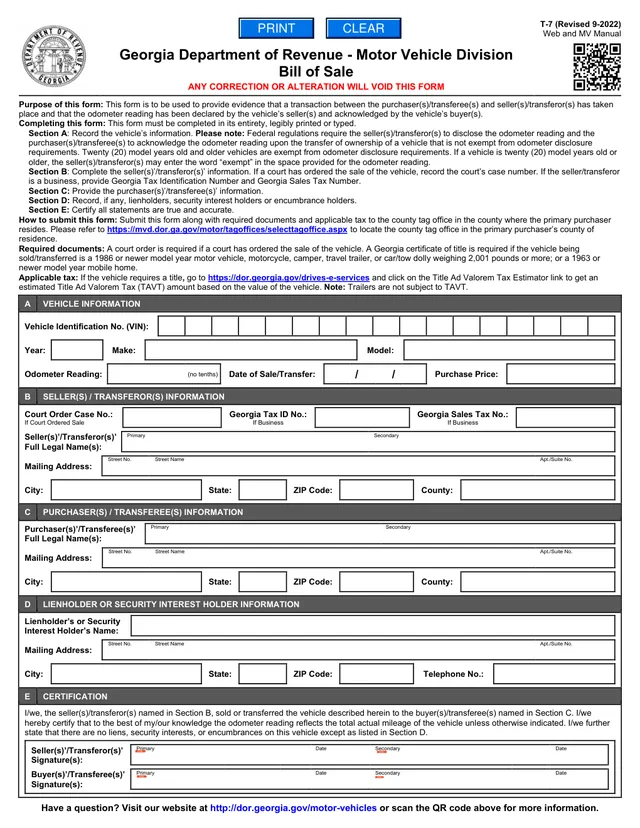
Have a question? Visit our website at http://dor.georgia.gov/motor-vehicles or scan the QR code above for more information.
T-7 (Revised 9-2022)
Web and MV Manual
Georgia Department of Revenue - Motor Vehicle Division
Bill of Sale
ANY CORRECTION OR ALTERATION WILL VOID THIS FORM
Purpose of this form: This form is to be used to provide evidence that a transaction between the purchaser(s)/transferee(s) and seller(s)/transferor(s) has taken place and that the odometer reading has been declared by the vehicle’s seller(s) and acknowledged by the vehicle’s buyer(s).
Completing this form: This form must be completed in its entirety, legibly printed or typed.
Section A: Record the vehicle’s information. Please note: Federal regulations require the seller(s)/transferor(s) to disclose the odometer reading and the purchaser(s)/transferee(s) to acknowledge the odometer reading upon the transfer of ownership of a vehicle that is not exempt from odometer disclosure requirements. Twenty (20) model years old and older vehicles are exempt from odometer disclosure requirements. If a vehicle is twenty (20) model years old or older, the seller(s)/transferor(s) may enter the word “exempt” in the space
How to fill it
Fill or edit this form in MePDF
- Preview page 1 to confirm the form name and revision.
- Select Fill form to answer the form one page at a time.
- Type an answer for each field; checkboxes and choices use the form’s own options.
- Preview the finished pages, then download the flattened PDF.
- The downloaded copy is image-only, so it cannot be edited as a form again.
Fill only the fields that apply and keep a copy of the finished PDF. The editor keeps the original layout while you fill the existing fields.