What's inside
Form content
Form I-134 Edition 11/09/23
Declaration of Financial Support
Department of Homeland Security
U.S. Citizenship and Immigration Services
USCIS
Expires 11/30/2026
START HERE - Type or print in black ink.
►
Part 1. Basis for Filing
1.
I am filing this form on behalf of:
Myself as the beneficiary.
Another individual who is the beneficiary.
Part 2. Information about the Beneficiary
Complete Part 2. regardless of whether you are filing this form on behalf of yourself as the beneficiary or on behalf of another individual who is the beneficiary.
Family Name (Last Name)
Given Name (First Name)
Middle Name
Beneficiary's Current Legal Name (Do not provide a nickname.)
1.
Provide all other names the beneficiary has ever used, including aliases, maiden name, and nicknames. If you need extra space to complete this section, use the space provided in Part 8. Additional Information.
Middle Name
Given Name (First Name)
Family Name (Last Name)
3.
Date of Birth (mm/dd/yyyy)
4.
Female
Gender
Male
A-
►
Alien Registration Number (A-Number) (if any)
5.
6.
Place of Birth
7.
Country of Citizenship or Nationality
Marital Status
8.
Divorced
Single, Never Married
Widowed
Married
Legally Separated
Other (Explain
How to fill it
Fill or edit this form in MePDF
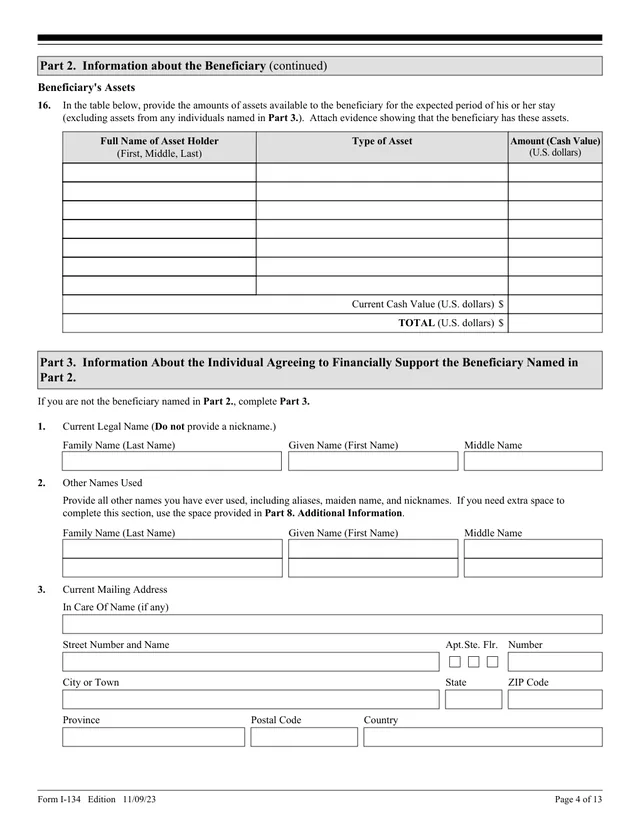
- Preview page 4 to confirm the form name and revision.
- Select Fill form to answer the form one page at a time.
- Type an answer for each field; checkboxes and choices use the form’s own options.
- Preview the finished pages, then download the flattened PDF.
- The downloaded copy is image-only, so it cannot be edited as a form again.
Spell names exactly as they appear in the passport. The editor keeps the original layout while you fill the existing fields.