What's inside
Form content
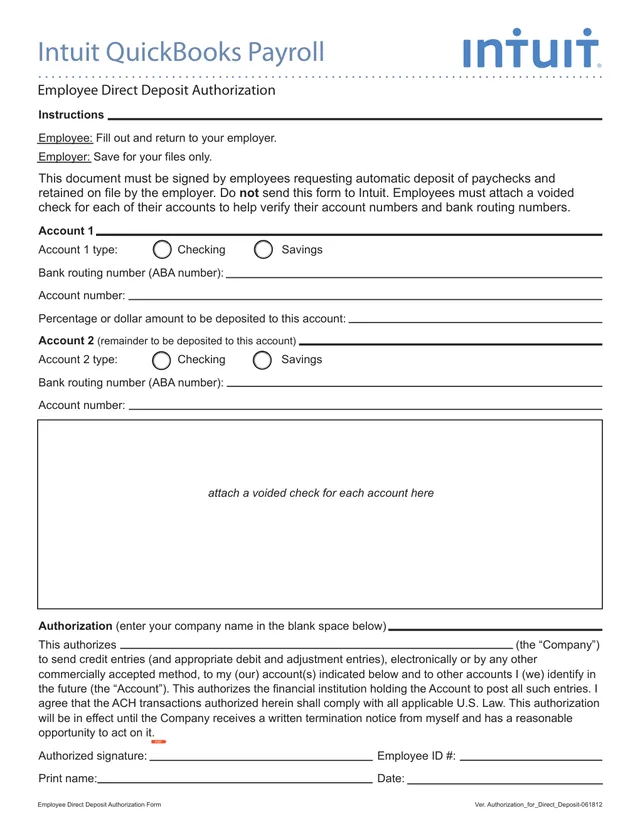
Instructions
Employee: Fill out and return to your employer.
Employer: Save for your files only.
This document must be signed by employees requesting automatic deposit of paychecks and retained on file by the employer. Do not send this form to Intuit. Employees must attach a voided check for each of their accounts to help verify their account numbers and bank routing numbers.
Account 1
Account 1 type:
Checking
Savings
Bank routing number (ABA number):
Account number:
Percentage or dollar amount to be deposited to this account:
Account 2 (remainder to be deposited to this account)
Account 2 type:
Checking
Savings
Bank routing number (ABA number):
Account number:
attach a voided check for each account here
Authorization (enter your company name in the blank space below)
This authorizes
(the “Company”) to send credit entries (and appropriate debit and adjustment entries), electronically or by any other commercially accepted method, to my (our) account(s) indicated below and to other accounts I (we) identify in the future (the “Account”). This authorizes the financial institution holding the Account to post all such entries. I agree that the ACH transactions authorized herein shall com
How to fill it
Fill or edit this form in MePDF
- Preview page 1 to confirm the form name and revision.
- Select Fill form to answer the form one page at a time.
- Type an answer for each field; checkboxes and choices use the form’s own options.
- Preview the finished pages, then download the flattened PDF.
- The downloaded copy is image-only, so it cannot be edited as a form again.
Fill only the fields that apply and keep a copy of the finished PDF. The editor keeps the original layout while you fill the existing fields.