What's inside
Form content
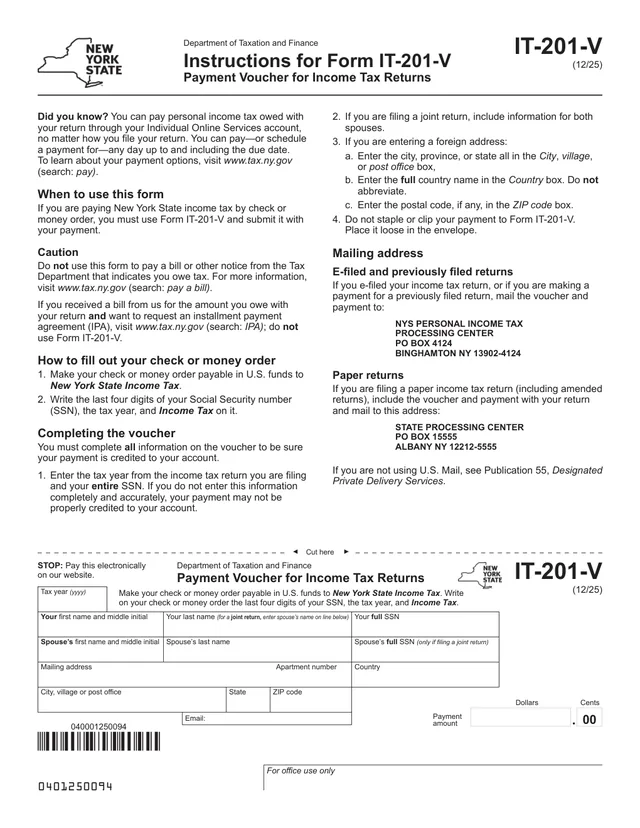
0401250094
040001250094
Department of Taxation and Finance
Instructions for Form IT-201-V
Payment Voucher for Income Tax Returns
IT-201-V
(12/25)
Did you know? You can pay personal income tax owed with your return through your Individual Online Services account, no matter how you file your return. You can pay—or schedule a payment for—any day up to and including the due date.
To learn about your payment options, visit www.tax.ny.gov
(search: pay).
When to use this form
If you are paying New York State income tax by check or money order, you must use Form IT-201-V and submit it with your payment.
Caution
Do not use this form to pay a bill or other notice from the Tax
Department that indicates you owe tax. For more information, visit www.tax.ny.gov (search: pay a bill).
If you received a bill from us for the amount you owe with your return and want to request an installment payment agreement (IPA), visit www.tax.ny.gov (search: IPA); do not use Form IT-201-V.
How to fill out your check or money order
1. Make your check or money order payable in U.S. funds to
New York State Income Tax.
2. Write the last four digits of your Social Security number
(SSN), the tax year, and Income Tax on
How to fill it
Fill or edit this form in MePDF
- Preview page 1 to confirm the form name and revision.
- Select Fill form to answer the form one page at a time.
- Type an answer for each field; checkboxes and choices use the form’s own options.
- Preview the finished pages, then download the flattened PDF.
- The downloaded copy is image-only, so it cannot be edited as a form again.
Keep the tax year and filing status consistent on every page. The editor keeps the original layout while you fill the existing fields.