What's inside
Form content
NAT 73657-05.2017
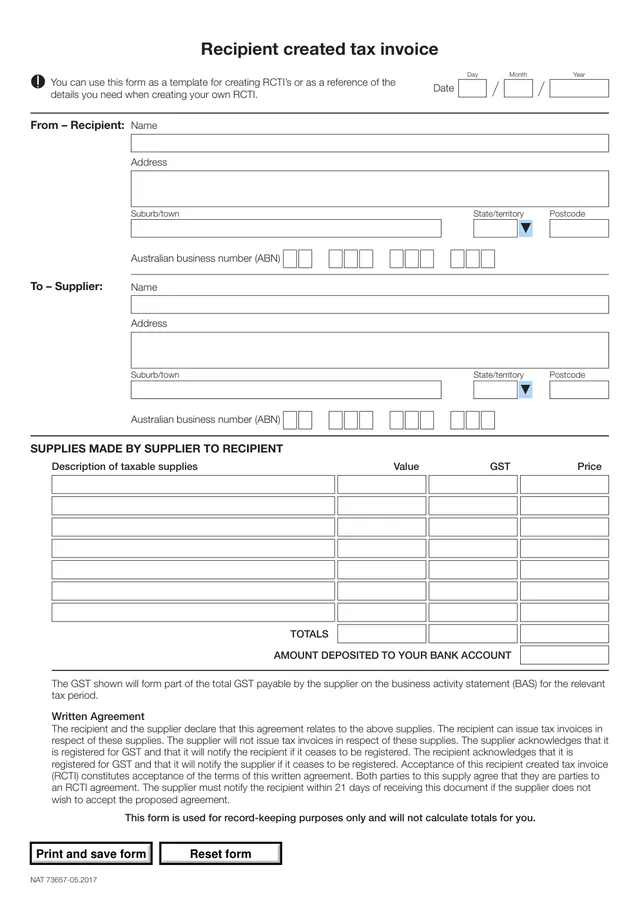
Recipient created tax invoice
Date
Day
Month
Year
Australian business number (ABN)
Name
From – Recipient:
Address
Suburb/town
Postcode
State/territory
Australian business number (ABN)
Name
To – Supplier:
Address
Suburb/town
Postcode
State/territory
SUPPLIES MADE BY SUPPLIER TO RECIPIENT
TOTALS
AMOUNT DEPOSITED TO YOUR BANK ACCOUNT
Description of taxable supplies
Value
GST
Price
The GST shown will form part of the total GST payable by the supplier on the business activity statement (BAS) for the relevant tax period.
Written Agreement
The recipient and the supplier declare that this agreement relates to the above supplies. The recipient can issue tax invoices in respect of these supplies. The supplier will not issue tax invoices in respect of these supplies. The supplier acknowledges that it is registered for GST and that it will notify the recipient if it ceases to be registered. The recipient acknowledges that it is registered for GST and that it will notify the supplier if it ceases to be registered. Acceptance of this recipient created tax invoice
(RCTI) constitutes acceptance of the terms of this written agreement. Both parties to this supply agree that they ar
How to fill it
Fill or edit this form in MePDF
- Preview page 1 to confirm the form name and revision.
- Select Fill form to answer the form one page at a time.
- Type an answer for each field; checkboxes and choices use the form’s own options.
- Preview the finished pages, then download the flattened PDF.
- The downloaded copy is image-only, so it cannot be edited as a form again.
Keep the tax year and filing status consistent on every page. The editor keeps the original layout while you fill the existing fields.