What's inside
Form content
page 1
Transfer or close an Optus account due to the loss of a loved one
Part A - Who can be a representative?
A representative can act on behalf of the deceased customer and can manage their accounts and services.
A representative can be:
• an executor, administrator or trustee of the deceased’s estate
• a lawyer or solicitor administering the will
• next of kin (an immediate family member such as a parent, son/daughter, sister/brother, grandchild, surviving spouse or guardian over the age of 18)
• a power of attorney
• an authorised representative listed on the Optus account
Please accept our condolences. The death of someone close is always a difficult time, so we’re here to help you manage their
Optus services as simply as possible.
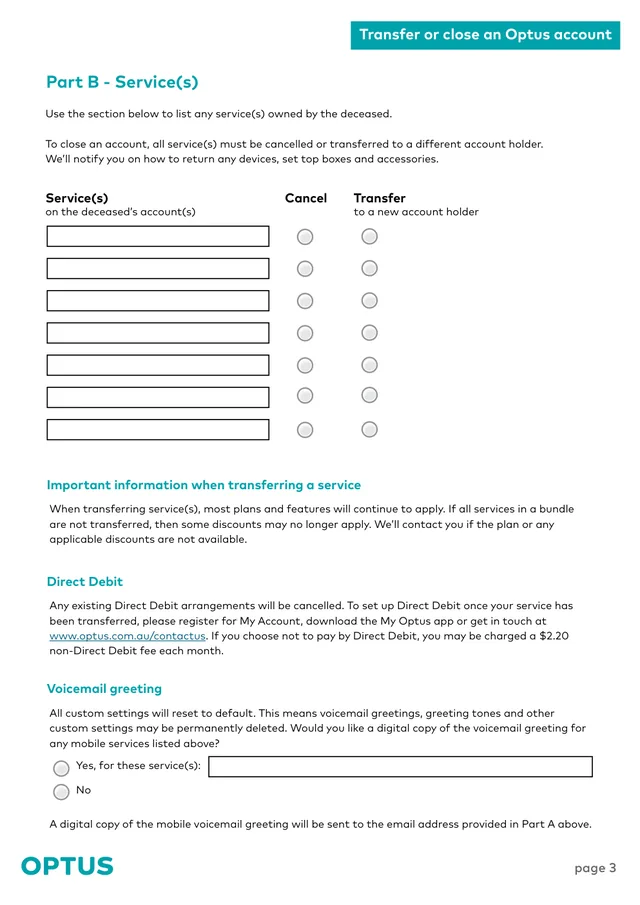
Part B - Service(s)
Please complete this section and indicate whether the service(s) are to be cancelled or transferred into a different account holder’s name.
Devices, set top boxes and accessories
We’ll let you know if you need to return any devices, set top boxes or accessories. We’ll also send a prepaid mail bag if needed.
Prepaid services
We’re unable to refund any unused credit for a Prepaid service that is cancelled.
Part C - Transfer details
How to fill it
Fill or edit this form in MePDF
- Preview page 3 to confirm the form name and revision.
- Select Fill form to answer the form one page at a time.
- Type an answer for each field; checkboxes and choices use the form’s own options.
- Preview the finished pages, then download the flattened PDF.
- The downloaded copy is image-only, so it cannot be edited as a form again.
Fill only the fields that apply and keep a copy of the finished PDF. The editor keeps the original layout while you fill the existing fields.