What's inside
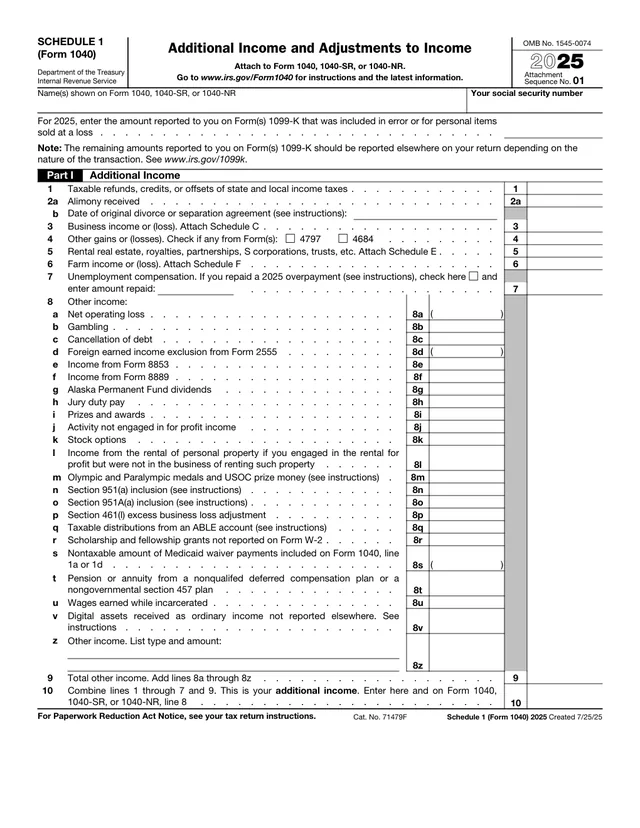
Form content
(Form 1040)
2025
Additional Income and Adjustments to Income
Attach to Form 1040, 1040-SR, or 1040-NR.
Go to www.irs.gov/Form1040 for instructions and the latest information.
Attachment
Sequence No. 01
Name(s) shown on Form 1040, 1040-SR, or 1040-NR
Your social security number
For 2025, enter the amount reported to you on Form(s) 1099-K that was included in error or for personal items sold at a loss .
.
.
.
.
.
.
.
.
.
.
.
.
.
.
.
.
.
.
.
.
.
.
.
.
.
.
.
.
.
.
.
Note: The remaining amounts reported to you on Form(s) 1099-K should be reported elsewhere on your return depending on the nature of the transaction. See www.irs.gov/1099k.
Part I
Additional Income
1
Taxable refunds, credits, or offsets of state and local income taxes .
.
.
.
.
.
.
.
.
.
.
.
1
2a
Alimony received
.
.
.
.
.
.
.
.
.
.
.
.
.
.
.
.
.
.
.
.
.
.
.
.
.
.
.
.
2a b
Date of original divorce or separation agreement (see instructions):
3
Business income or (loss). Attach Schedule C .
.
.
.
.
.
.
.
.
.
.
.
.
.
.
.
.
.
.
3
4
Other gains or (losses). Check if any from Form(s):
4797
4684
.
.
.
.
.
.
.
.
.
4
5
Rental real estate, royalties, partnerships, S corporations, trusts, etc. Attach Schedule E .
.
.
.
.
5
6
Farm inco
How to fill it
Fill or edit this form in MePDF
- Preview page 1 to confirm the form name and revision.
- Select Fill form to answer the form one page at a time.
- Type an answer for each field; checkboxes and choices use the form’s own options.
- Preview the finished pages, then download the flattened PDF.
- The downloaded copy is image-only, so it cannot be edited as a form again.
Fill only the fields that apply and keep a copy of the finished PDF. The editor keeps the original layout while you fill the existing fields.