What's inside
Form content
Form
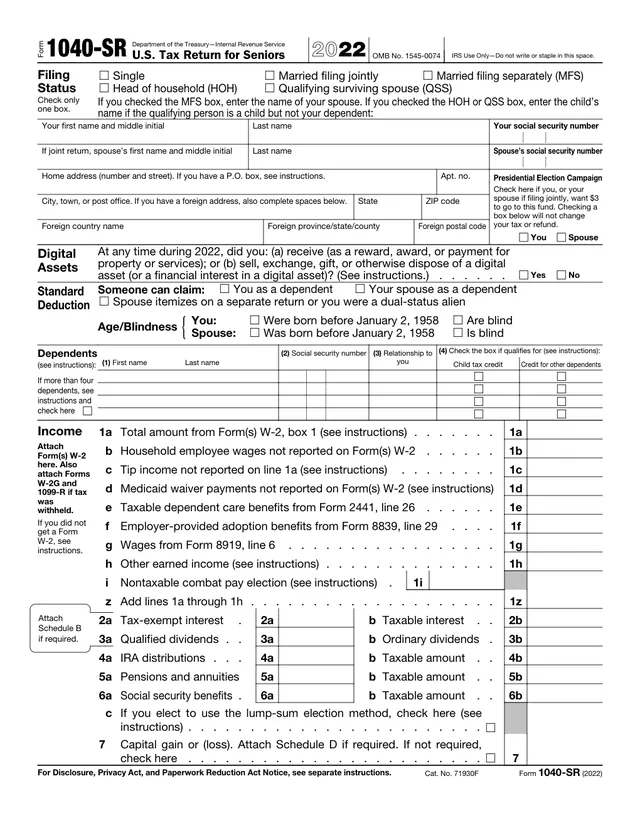
1040-SR
2022
U.S. Tax Return for Seniors
IRS Use Only—Do not write or staple in this space.
Filing
Status
Check only one box.
Single
Married filing jointly
Married filing separately (MFS)
Head of household (HOH)
Qualifying surviving spouse (QSS)
If you checked the MFS box, enter the name of your spouse. If you checked the HOH or QSS box, enter the child’s name if the qualifying person is a child but not your dependent:
Your first name and middle initial
Last name
Your social security number
If joint return, spouse’s first name and middle initial
Last name
Spouse’s social security number
Home address (number and street). If you have a P.O. box, see instructions.
Apt. no.
City, town, or post office. If you have a foreign address, also complete spaces below.
State
ZIP code
Foreign country name
Foreign province/state/county Foreign postal code
Presidential Election Campaign
Check here if you, or your spouse if filing jointly, want $3 to go to this fund. Checking a box below will not change your tax or refund.
You
Spouse
Digital
Assets
At any time during 2022, did you: (a) receive (as a reward, award, or payment for property or services); or (b) sell, exchange, gift, or otherwise d
How to fill it
Fill or edit this form in MePDF
- Preview page 1 to confirm the form name and revision.
- Select Fill form to answer the form one page at a time.
- Type an answer for each field; checkboxes and choices use the form’s own options.
- Preview the finished pages, then download the flattened PDF.
- The downloaded copy is image-only, so it cannot be edited as a form again.
Fill only the fields that apply and keep a copy of the finished PDF. The editor keeps the original layout while you fill the existing fields.