What's inside
Form content
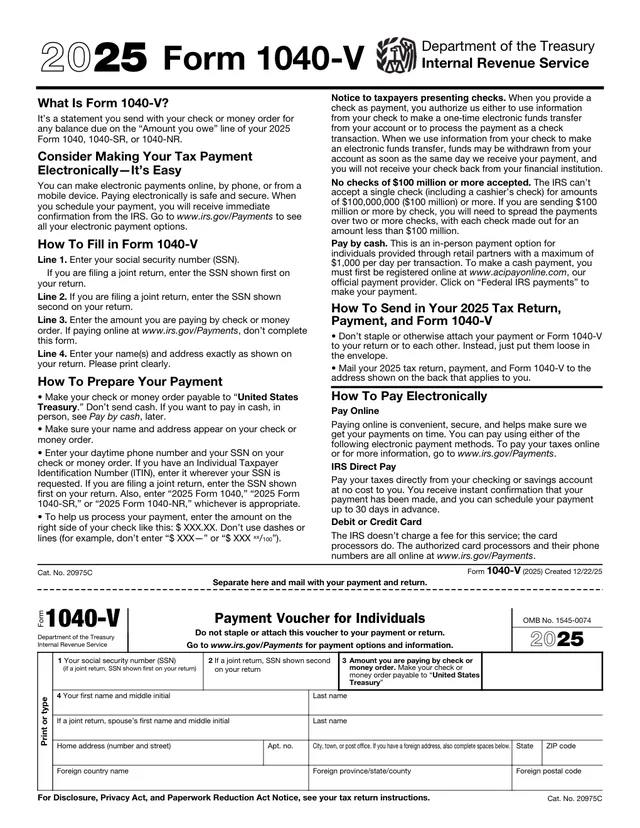
2025 Form 1040-V
What Is Form 1040-V?
It’s a statement you send with your check or money order for any balance due on the “Amount you owe” line of your 2025
Form 1040, 1040-SR, or 1040-NR.
Consider Making Your Tax Payment
Electronically—It’s Easy
You can make electronic payments online, by phone, or from a mobile device. Paying electronically is safe and secure. When you schedule your payment, you will receive immediate confirmation from the IRS. Go to www.irs.gov/Payments to see all your electronic payment options.
How To Fill in Form 1040-V
Line 1. Enter your social security number (SSN).
If you are filing a joint return, enter the SSN shown first on your return.
Line 2. If you are filing a joint return, enter the SSN shown second on your return.
Line 3. Enter the amount you are paying by check or money order. If paying online at www.irs.gov/Payments, don’t complete this form.
Line 4. Enter your name(s) and address exactly as shown on your return. Please print clearly.
How To Prepare Your Payment
• Make your check or money order payable to “United States
Treasury.” Don’t send cash. If you want to pay in cash, in person, see Pay by cash, later.
• Make sure your name and address ap
How to fill it
Fill or edit this form in MePDF
- Preview page 1 to confirm the form name and revision.
- Select Fill form to answer the form one page at a time.
- Type an answer for each field; checkboxes and choices use the form’s own options.
- Preview the finished pages, then download the flattened PDF.
- The downloaded copy is image-only, so it cannot be edited as a form again.
Fill only the fields that apply and keep a copy of the finished PDF. The editor keeps the original layout while you fill the existing fields.