What's inside
Form content
2026
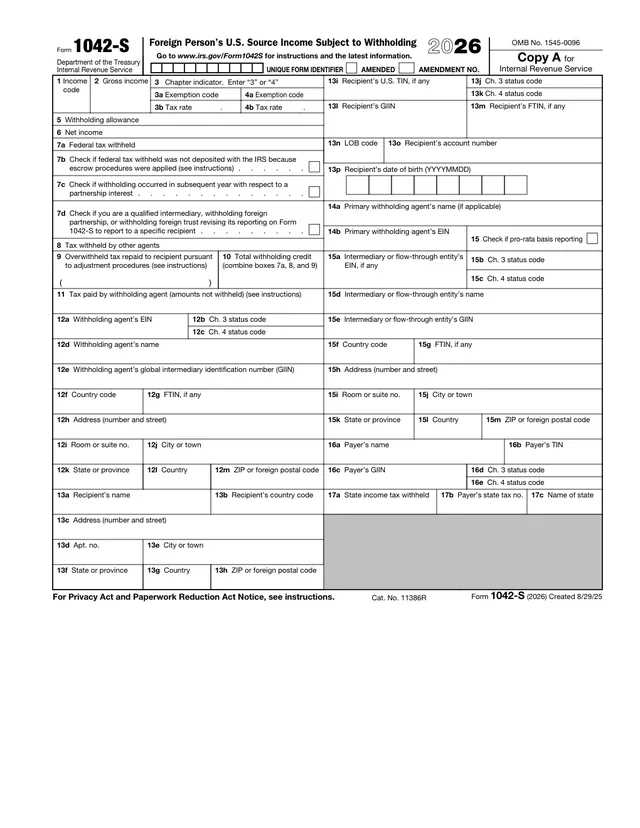
Foreign Person’s U.S. Source Income Subject to Withholding
Go to www.irs.gov/Form1042S for instructions and the latest information.
Copy A for
UNIQUE FORM IDENTIFIER
AMENDED
AMENDMENT NO.
1 Income code
2 Gross income 3 Chapter indicator. Enter “3” or “4”
3a Exemption code
3b Tax rate
.
4a Exemption code
4b Tax rate
.
5 Withholding allowance
6 Net income
7a Federal tax withheld
7b Check if federal tax withheld was not deposited with the IRS because escrow procedures were applied (see instructions) .
.
.
.
.
.
7c Check if withholding occurred in subsequent year with respect to a partnership interest .
.
.
.
.
.
.
.
.
.
.
.
.
.
7d Check if you are a qualified intermediary, withholding foreign partnership, or withholding foreign trust revising its reporting on Form
1042-S to report to a specific recipient .
.
.
.
.
.
.
.
.
8 Tax withheld by other agents
9 Overwithheld tax repaid to recipient pursuant to adjustment procedures (see instructions)
( )
10 Total withholding credit
(combine boxes 7a, 8, and 9)
11 Tax paid by withholding agent (amounts not withheld) (see instructions)
12a Withholding agent’s EIN
12b Ch. 3 status code
12c Ch. 4 status code
12d Withholding agent’s name
12e
How to fill it
Fill or edit this form in MePDF
- Preview page 1 to confirm the form name and revision.
- Select Fill form to answer the form one page at a time.
- Type an answer for each field; checkboxes and choices use the form’s own options.
- Preview the finished pages, then download the flattened PDF.
- The downloaded copy is image-only, so it cannot be edited as a form again.
Keep the tax year and filing status consistent on every page. The editor keeps the original layout while you fill the existing fields.