What's inside
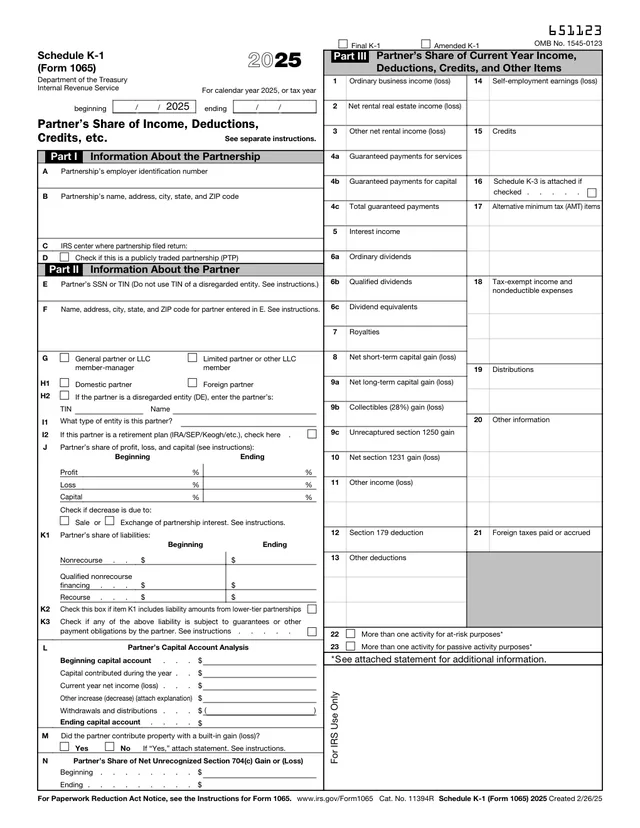
Form content
(Form 1065)
2025
Partner’s Share of Income, Deductions,
Credits, etc.
See separate instructions.
For calendar year 2025, or tax year beginning
/
/ 2025 ending
/
/
651123
Final K-1
Amended K-1
Information About the Partnership
Part I
A
Partnership’s employer identification number
B
Partnership’s name, address, city, state, and ZIP code
C
IRS center where partnership filed return:
D
Check if this is a publicly traded partnership (PTP)
Information About the Partner
Part II
E
Partner’s SSN or TIN (Do not use TIN of a disregarded entity. See instructions.)
F
Name, address, city, state, and ZIP code for partner entered in E. See instructions.
G
General partner or LLC member-manager
Limited partner or other LLC member
H1
Domestic partner
Foreign partner
H2
If the partner is a disregarded entity (DE), enter the partner’s:
TIN
Name
I1
What type of entity is this partner?
I2
If this partner is a retirement plan (IRA/SEP/Keogh/etc.), check here
.
J
Partner’s share of profit, loss, and capital (see instructions):
Beginning
Ending
Profit
%
%
Loss
%
%
Capital
%
%
Check if decrease is due to:
Sale or
Exchange of partnership interest. See instructions.
K1
Partner’s share of liabilities:
Beginning
How to fill it
Fill or edit this form in MePDF
- Preview page 1 to confirm the form name and revision.
- Select Fill form to answer the form one page at a time.
- Type an answer for each field; checkboxes and choices use the form’s own options.
- Preview the finished pages, then download the flattened PDF.
- The downloaded copy is image-only, so it cannot be edited as a form again.
Fill only the fields that apply and keep a copy of the finished PDF. The editor keeps the original layout while you fill the existing fields.